- Award score
- 4.6Rating
- 500,000,000+installs
- Free
App information
- Version
- 13.084.006
- Updated
- Requires
- 7.0
- Price
- Free, in-app purchases
- Developer
- AMANOTES PTE. LTD.
- Content rating
- Everyone 10+
Screenshots






 Analysis byAppsAward
Our review of Magic Tiles 3™ - Piano Game
I like rhythm games that are easy to start but still ask for real attention, and Magic Tiles 3™ fits that space well. You tap piano-style tiles in time with music, trying to keep the sequence going as the notes move down the screen. The idea takes seconds to understand; keeping your timing steady when patterns become more demanding is the real test. It works for a quick break, but it can also become a focused practice game if you enjoy repeating a section to improve.
How a typical session flows
On opening the game, I’d treat the first few songs as a chance to learn how the tiles respond rather than as a score chase. Keep your hands relaxed, watch the next notes instead of staring at the tile you are about to tap, and use a comfortable grip. Those small habits make a noticeable difference because hurried taps can throw off your rhythm even when you recognise the tune.
The basic loop is satisfying: listen, read the pattern, tap, and adjust. Piano sounds give the game a clear musical identity, while the tile layout makes the action legible on a phone screen. I find that this works best in short bursts. A few attempts at a song can feel rewarding; a long session of chasing a perfect run can become tiring for your eyes and hands.
One useful everyday scenario is playing during a short wait, with headphones on and enough quiet to hear the beat. It is also a reasonable choice for a commute if you are seated and can give the screen your attention. I would not recommend trying to play while walking, crossing a street, or doing anything that requires awareness of your surroundings. The game rewards concentration, not divided attention.
There is a practical distinction between enjoying a song and improving at it. If a run ends, I try to notice whether I missed a tile because I lost the beat, looked too far ahead, or simply tapped too early. That gives the next attempt a purpose. Repeating the same song without changing anything can still be entertaining, but it is less likely to help when the same mistake keeps appearing.
Building a repeatable rhythm habit
For a more consistent routine, I’d pick one song and play it several times before switching. Start by aiming to get through the pattern cleanly, then pay attention to the point where your timing tends to slip. In a later attempt, focus on that transition rather than trying to improve every part at once. This kind of small, repeatable goal is more useful than treating every run as a full test of skill.
When a pattern becomes busy, avoid reacting only to the tile closest to the bottom of the screen. Glancing slightly ahead helps you prepare your next tap without losing contact with the current beat. The balance takes practice: look too far forward and you may mistime the immediate note; look only at the bottom and you may feel constantly surprised. I find a relaxed middle distance is the most dependable approach.
The game is a music title from AMANOTES PTE. LTD., and its broad appeal is reflected in an average rating of 4.6 from around 3.6 million ratings. That audience size can make it feel like a familiar, well-established pick in mobile rhythm games. Still, popularity does not make it the right fit for everyone: whether the format clicks depends on how much you enjoy reading visual patterns while keeping time.
Settings and choices that affect comfort
Before settling into longer play, check the available settings and make sure the sound and control experience suit your device and surroundings. I would start with a comfortable volume, then test whether the game feels manageable with the phone held in one hand or supported in both. There is no universal grip: a smaller device may be easy to steady, while a larger screen can feel less nimble during quick sequences.
If you are playing in a shared room, lower the sound or use headphones rather than relying on loud playback. That helps you focus on the music without turning a quick game into a distraction for everyone nearby. It is also worth keeping the screen clean and choosing a stable place to sit. Fingerprints, glare, and an awkward posture can make timing harder, even though they have nothing to do with musical ability.
The store summary highlights offline music play, which makes the game appealing when a connection is inconvenient. I would still make a simple habit of opening it and checking that the experience you want is ready before leaving home, rather than assuming every situation will behave exactly as it does online. For travel, the most reliable plan is to test your intended play session in advance and keep expectations modest if you are depending on a particular song or mode.
For younger players, the age guidance is Everyone 10+. I’d still suggest that a parent look at the in-app purchase options and decide whether spending controls are appropriate for the device. The game is free to download, while optional purchases range from $0.99 to $49.99 per item. That is a broad enough range that it is sensible to check purchase settings before handing a phone to a child or letting them play unsupervised.
Getting quicker without turning play into a chore
Experienced players often benefit more from consistency than from frantic tapping. I recommend using the same comfortable hand position, keeping the phone steady, and returning to a song after a short pause if your timing starts to deteriorate. Fatigue can make a familiar sequence feel unexpectedly difficult. A brief reset is often better than forcing another attempt with tense fingers and a rushed eye.
It also helps to separate listening from visual reading. On a first pass, notice the pulse and the general shape of the sequence. On the next, use that familiarity to anticipate what is coming while still responding to what is on screen. This is not a shortcut that guarantees a high score; it is simply a way to reduce the feeling that every tile arrives as a surprise.
When you make a mistake, resist the urge to immediately tap faster. The failure may come from rushing ahead of the music, not from being too slow. I’d use a few attempts to test one adjustment at a time: a softer touch, a steadier gaze, or a more relaxed pace. Changing several things at once makes it harder to tell what actually helped.
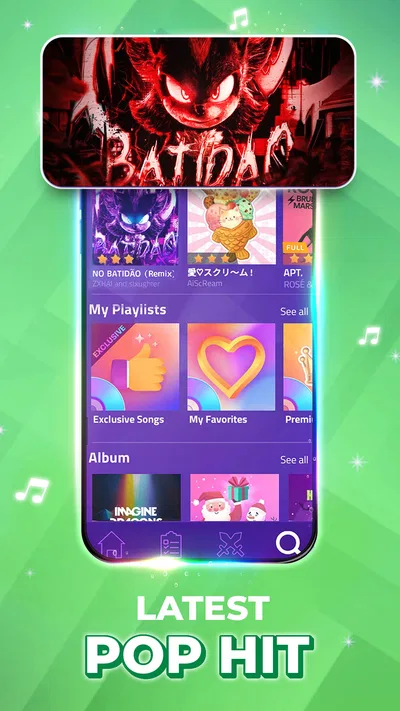
The music selection includes familiar pop-oriented appeal and seasonal material, while the store summary also calls out the demanding Rush E challenge. That range gives the game a useful contrast: some sessions can be about enjoying a recognisable musical feel, while others are more about testing coordination. If a difficult challenge stops being fun, there is no reason to make it your measure of whether you are good at the game.
Where the format reaches its limits
Magic Tiles 3 is best understood as a reflex-and-rhythm game, not as a piano-learning tool. Tapping notes can make you more attentive to timing and visual sequences, but it does not teach keyboard technique, reading sheet music, or how to play a piano. If your main goal is learning an instrument, a structured lesson app or a real keyboard will serve you better. This game is for musical play, not a substitute for instruction.
Compared with rhythm games built around a more elaborate instrument layout or a dedicated controller, this tile-based approach is easier to pick up on a touchscreen. The trade-off is that your main task remains tapping the moving pattern, so players seeking deeper instrument simulation may find it too simple. Compared with casual tap games that ask for little attention to the soundtrack, this one leans more heavily on timing and listening. That makes it more absorbing, but also less suitable when you want something you can play absent-mindedly.
There is another trade-off in the attempt-and-repeat loop. It makes improvement easy to feel because you can return to a song and try again, but it can encourage score chasing. If you find yourself replaying out of frustration rather than enjoyment, switch songs or stop for a while. The game is at its best when the challenge feels like a playful test of timing, not an obligation to perfect every run.
Its scale is substantial, with over 500 million installs, and the game remains free to start. The current version is 13.084.006, and it runs on Android 7.0 or later. Those details make it accessible to a wide range of Android users, though the actual comfort of play still depends on screen size, responsiveness, and how steady you can hold the device.
Who I’d recommend it to
I’d recommend Magic Tiles 3™ to someone who wants a music game that starts quickly, has a clear tapping mechanic, and offers room to refine timing through repeat attempts. It is especially suited to people who enjoy short challenges, can focus on a screen for a few minutes, and like having music drive the action. If you want a casual game with a little more concentration than simple tapping, it is a good fit.
I’d steer away from it if you dislike repeated retries, find fast visual patterns stressful, or want a game that can safely hold your attention while you do something else. It may also disappoint players expecting piano lessons, a realistic instrument, or a calm listening experience. The tiles demand active input, and the tougher challenges can make the game feel more like a coordination test than a relaxing music player.
For me, the best way to enjoy it is to choose a song, set a small goal, and stop once the session stops feeling fun. Its 4.6 average rating and large player base suggest that the basic appeal has reached a lot of people, but my recommendation is more specific: it is worth trying if you want an approachable mobile rhythm game and are comfortable with its retry-driven style. Keep your grip steady, look slightly ahead, and let the beat—not impatience—set your pace.
My verdict: Magic Tiles 3 is a lively, accessible choice for quick rhythm challenges, with enough variation to reward focused practice. It is not the best option for learning piano or for hands-off listening, and optional purchases are worth reviewing before younger players use it. If tapping to music sounds more inviting than intimidating, I think it is an easy game to try and a satisfying one to revisit in short sessions.
Pros
- Easy one-touch controls make the game quick to pick up.
- A wide range of songs keeps the music selection varied.
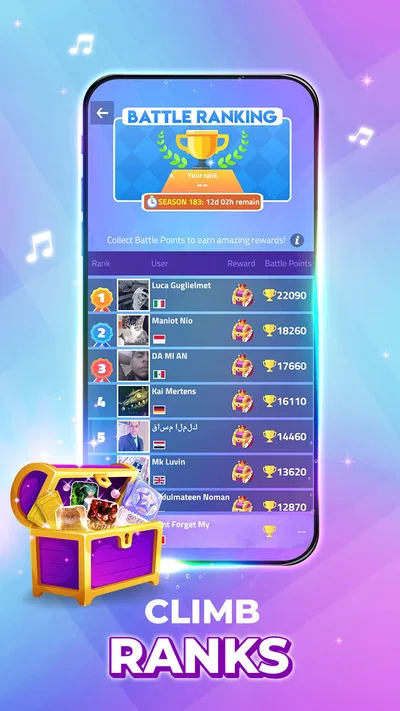
- Online battles add a competitive challenge.
- New songs and events help keep gameplay fresh.
- Short rounds make it suitable for quick play sessions.
Cons
- Fast note patterns can feel difficult for beginners.
- Some songs and features may require in-app purchases.
- Ads can interrupt the experience between rounds.
- A stable internet connection is needed for some modes.
- Repeated play can feel similar across different songs.
Best Music Game 2026
Our verdict
Tap tiles piano kpop rhythm, Christmas song, offline music game Rush E challenge
Frequently Asked Questions
What is Magic Tiles 3™ - Piano Game?
Magic Tiles 3 is a rhythm game built around tapping tile patterns in time with music. As a song plays, tiles move down the screen, and you tap them before they pass the target area. It combines familiar piano-style melodies with pop, classical, and other music selections, alongside challenges and competitive modes. The game is designed for quick sessions, but faster songs and longer patterns can demand concentration and precise timing.
Is Magic Tiles 3 free to download and play?
The game is generally free to download, and you can start playing without buying it. However, it may offer optional in-app purchases, such as items or benefits that affect access to content or progression, and advertisements may also appear. What is available can change with updates, region, or account settings. Check the current store listing and in-game purchase details before downloading, and use device purchase controls if you want to prevent unintended spending.
Can I play Magic Tiles 3 offline?
Some available songs or game features may work without an internet connection, but you should not assume the entire game is playable offline. Online access can be needed for features such as competitive play, rankings, account services, advertisements, or downloading and updating music content. Availability may also depend on whether a song has already been loaded. If offline play matters to you, test the game before relying on it during travel, and review its current store information for connection requirements.
Does Magic Tiles 3 work well for beginners, and is it difficult?
The basic controls are simple: tap the tiles in time with the music and avoid missing notes. That makes it easy to understand, although keeping up with faster tracks and more complex patterns takes practice. Beginners can start with songs that feel manageable and gradually try harder challenges. The experience relies on timing and coordination, so difficulty may vary with the song, device responsiveness, and personal familiarity with rhythm games. It is not a piano lesson or a substitute for learning an instrument.
What should I know about permissions, ads, and in-app purchases before downloading?
Before installing Magic Tiles 3, review the app store’s current privacy information, age rating, and permissions, since these details can change across versions and regions. The game may include advertising and optional in-app purchases, while online features can involve data use. Avoid sharing personal information in public or competitive areas, and supervise younger players where appropriate. You can also check your device’s privacy settings and enable purchase authentication to reduce unexpected charges.




