
- Award score
- 4.8Rating
- 100,000+installs
- Free
App information
Screenshots

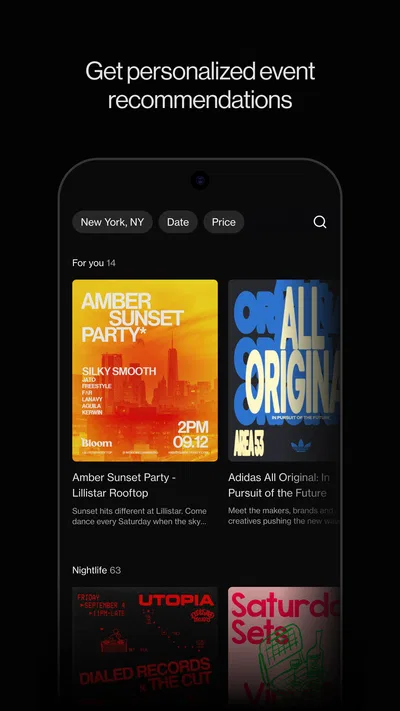




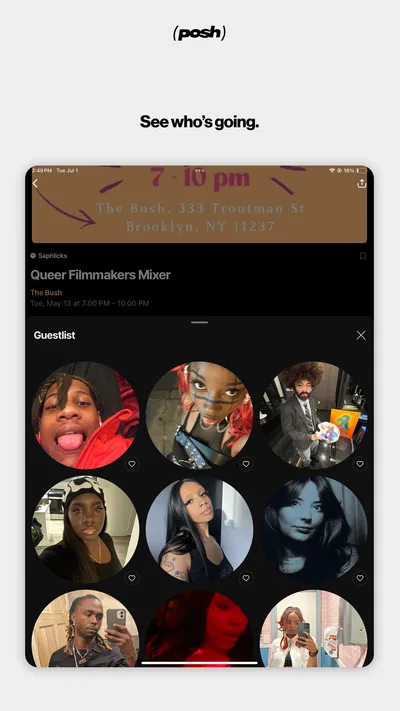

 Analysis byAppsAward
Our review of Posh – Create & Find Events
Planning a night out with friends often means juggling a group chat, a calendar, and a separate place to find something worth attending. Posh is an events app that brings discovery and event organizing into one social setting. I find that most useful when a group wants to move from “we should do something” to choosing an actual event, while still keeping expectations realistic: it is a place to explore and coordinate, not a magic fix for indecisive friends or scattered plans.
When a group shares the planning
Picture a household deciding what to do on a free evening. One person spots an event, another wants to check the details, and a third needs to know whether anyone else is interested before committing. Posh can give that conversation a more concrete starting point than a string of vague messages: people can look at events and organizers in the same app, then discuss a specific option rather than trying to describe it from memory.
That shared-use angle is valuable even when everyone has their own phone. The practical benefit is not that one person can manage everyone else’s account; it is that a group can use a common event discovery space and make its own decisions. I would still keep personal logins and account choices individual. Treating the app as a shared household account can blur who is expressing interest or managing a plan, so separate accounts and a group chat for the final details are a cleaner arrangement.
Posh is a free events app from Posh, and its social emphasis makes it a better fit for finding things to do with other people than for maintaining a private household calendar. Its wider ecosystem includes over five million eventgoers and organizers, which gives the service a community-oriented feel. That scale is a useful sign of the app’s intended role, but it does not mean every local area will have the same range of events; the value still depends on what is happening near you.
What to decide before setting it up
Before inviting friends or family into an event plan, I would agree on a simple boundary: use Posh to browse and coordinate interest, then confirm any important logistics directly with the group. That avoids assuming that an in-app signal is the same as a firm promise to attend. It also helps when plans depend on practical details such as who is available, how everyone will get there, or whether the event suits the whole group.
This distinction matters in a shared-device household. A phone handed around the kitchen table may make browsing convenient, but account activity and personal preferences should remain attached to the person using the account. I would not leave a signed-in app open on a device that other household members use casually. The sensible workflow is to let each person explore on their own device, then use a group conversation to settle the plan.
For a low-friction first try, I would start with one specific outing rather than asking everyone to adopt a new routine. One person can browse, share a candidate event with the group, and see whether the app helps them reach a decision faster than their usual mix of search and messaging. If it does, it has earned a place in the planning process; if the group already has an effective way to find local events, there is no need to make Posh another obligation.
Finding an event without losing the thread
The useful coordination pattern is to separate discovery from commitment. First, browse for an event that genuinely fits the group. Then ask the questions that matter to your particular outing: who wants to go, what timing works, and what information still needs checking. This keeps the app’s event focus from being confused with a complete itinerary or a shared calendar.
A concrete example: on a weekday, I might be looking for something to do over the weekend with a friend who has a different schedule. Rather than sending a broad “anything happening?” message, I can use Posh to find a possible event and bring that choice to the conversation. My friend can respond to a real option, and we can settle the remaining details elsewhere. That is a small change, but it can reduce the back-and-forth that often kills a casual plan.
For households coordinating more than one person, I would also make the plan explicit in ordinary language. Who is interested is not necessarily who is attending, and an event someone saves or discusses should not be treated as a confirmed family outing. This is especially helpful when one person is planning for others: ask before assuming, and keep transport, timing, and any personal arrangements clear in the group chat.
Compared with relying only on general social media, Posh gives event discovery a more focused home. Compared with a calendar app, it is oriented toward finding and organizing events rather than tracking every household commitment. And compared with a messaging app, it can give the group something concrete to discuss, while messages remain better for quick questions and last-minute changes. I see it as a companion to those familiar tools, not a full replacement for them.
Where it fits—and where it may not
Posh is most appealing if you enjoy going out, like discovering events through a community, or sometimes organize gatherings yourself. The developer’s store summary positions it around connecting eventgoers and organizers, and that makes the app’s purpose easy to understand: it is meant to bring those sides of event life into one ecosystem. The app is free, so trying it does not require an upfront purchase.
It may be less useful if your main need is a private family calendar, a detailed task manager, or a dependable record of everyone’s commitments. Those tools solve a different problem. If a household mostly needs to know who is picking someone up or when an appointment starts, a shared calendar and direct messages are likely more straightforward. Posh makes more sense when the first question is “What event could we go to?” rather than “What does everyone need to remember?”
There is also a natural trade-off in community-based discovery: a larger network can make the service more interesting, but relevance is local and personal. An event that suits one person may not suit a household, and browsing options can take time if the group has not agreed on what it wants. I would narrow the search by deciding the occasion or the kind of outing first, then bring only a short list to the group. That keeps discovery from turning into an endless scroll or a debate over every possibility.
The app’s rating is 4.8 from around 2,400 ratings, with 165 written reviews, and it has passed 100,000 installs. Those figures suggest that it has found an audience, but they cannot tell me whether its event selection matches a particular neighborhood or whether a given group will enjoy its approach. I would judge it by one practical test: does it help you find a worthwhile event and get the right people talking about it?
Age, trust, and household expectations
Posh is rated Teen, so I would treat that age context as a starting point for a household conversation, not as a substitute for a parent or guardian’s judgement. If a teenager wants to use it, discuss what kinds of events are appropriate, how they will decide whether to attend, and which trusted person should know the plan. Those expectations are more useful than assuming that an app’s age label answers every question about a particular event or situation.
For adults coordinating with younger household members, I would keep the boundary clear: finding an event does not automatically make it suitable for everyone, and interest is not permission or a final plan. Review the event together, confirm details through the relevant channels, and make sure the young person knows how to ask questions before agreeing to go. I would not assume that Posh provides household supervision or family-management tools; the responsible approach is to set expectations outside the app.
That caution applies to account trust as well. Avoid sharing passwords simply to make planning easier, and do not let a shared phone make it unclear who is using an account. If several people browse together, one person can show an event while each person makes their own choice. This protects personal boundaries without making a casual outing feel overly formal.
Posh was released on May 16, 2023, and its current version is 8.24.0. It supports devices running Android 8.0 or later. Those details make it easier to check basic compatibility before installing, especially if a household member uses an older phone. For iPhone or other platform availability, I would check the relevant app store on the device rather than assume that the same requirements apply.
My household verdict
My recommendation is to think of Posh as an event-finding and organizing space that can give a household or friend group a shared starting point. It is not a family-control product, a general calendar, or a guarantee that every outing will be easy to arrange. Used alongside individual accounts, direct conversation, and sensible age-appropriate judgement, it can make the move from browsing to discussing a real plan feel more focused.
The best reason to try it is that your group wants fresh event ideas, not another place to store chores and appointments. Start with one outing, confirm interest directly, and keep the practical arrangements clear. If Posh helps your group discover something it would otherwise miss, it is doing its job. If your household mainly needs reminders and schedule coordination, stick with a shared calendar and messaging; those are better tools for that need.
Overall, I would recommend Posh to people who enjoy exploring events and want a more event-centered way to bring friends or household members into the conversation. Its strongest use is the handoff from “what could we do?” to “does this specific event work for us?” Just keep expectations grounded: the app can support discovery and coordination, while the group still has to make the decision, respect account boundaries, and confirm the details together.
Pros
- Create polished event invitations with customizable designs.
- Discover events based on your interests and location.
- Share event details with guests in one place.
- Keep track of invitations and attendee responses.
- Useful for both personal gatherings and public events.
Cons
- Some features may require a paid subscription.
- Event discovery depends on activity in your area.
- Guests may need the app to use all event features.
- Limited local listings can make discovery feel sparse.
- Creating an account is required to use the platform.
Best Events App 2026
Our verdict
Connect with an ecosystem of 5M+ eventgoers and organizers.
Frequently Asked Questions
What is Posh – Create & Find Events used for?
Posh is an event discovery and hosting app designed to help people find gatherings and create their own events. You can browse events listed in your area, check details such as the time and location, and use the app to connect with event hosts. What is available depends on the events posted in your location, so the selection may vary from one city or date to another.
Can I use Posh to create and manage my own event?
Yes, Posh is intended to let users create events as well as discover them. When setting one up, you can provide information such as the event name, description, time, and location, then share its listing with potential guests. The options for guest access, invitations, and event management may depend on the app’s current features and settings, so review the setup screens before publishing.
Does Posh charge a fee to attend or host events?
Costs depend on the individual event and the way its host has configured it. Some events may be free, while others may require a ticket or payment, and any fees or conditions should be shown in the event listing or checkout flow. Do not assume that downloading Posh guarantees free entry; check the full price, cancellation terms, and payment details before confirming.
How can I find events that are relevant to me on Posh?
Start by exploring the event listings available in your area and reviewing each listing’s date, location, description, and other details. Availability is influenced by where you are and what hosts have published, so a smaller town or a quiet date may show fewer choices than a large city. Check that an event’s location and schedule suit you before making plans.
What should I check before downloading or attending an event through Posh?
Before downloading, review the app’s current store listing for device compatibility, permissions, and privacy information. Before attending, confirm the event’s exact time and location, entry requirements, price, and any host instructions. Event details are provided by organizers and can change, so check for updates and use sensible precautions when meeting people or visiting an unfamiliar venue.




