
- Award score
- 4.7Rating
- 5,000,000,000+installs
- Free
App information
- Version
- 584.1.0.61.98
- Updated
- Requires
- Varies with device
- Price
- Free, in-app purchases
- Developer
- Meta Platforms, Inc.
- Content rating
- Everyone
Screenshots




 Analysis byAppsAward
Our review of Messenger
I’d choose Messenger when the people I need to reach are already connected through Facebook and I want conversations, calls, and shared media in one familiar place. It is a free communication app from Meta Platforms, Inc., and its reach is its most practical advantage: I’m less likely to persuade friends or relatives to install something new just so we can stay in touch. That convenience matters more to me than having the most minimalist chat screen.
Messenger is a particularly easy recommendation for mixed groups: family members who prefer messages, friends who send photos, and people who would rather talk face to face over a call. It is less compelling if your priority is to keep every conversation in a separate, uncluttered app or to avoid having another account-based service in your daily routine. My decision comes down to a simple question: are the people I want to contact already there?
What matters when choosing a chat app
For everyday messaging, I judge an app by more than whether a text arrives. I want to find the right person quickly, move from typing to a call without unnecessary setup, and share something without having to explain where it went. Messenger does well when a conversation needs to change shape: a quick question can turn into a longer exchange, a shared image can provide context, and a voice or video call can take over when typing becomes awkward.
That flexibility is useful, but it also means Messenger can feel busier than a bare-bones texting tool. A communication app has to serve people who use it for different kinds of contact, and its broad role can put more choices in front of you than you need for a simple “Are we still meeting?” If you mainly want a quiet inbox for a small number of people, a simpler messaging option may feel easier to manage.
Reach is another important part of the choice. Messenger has a 4.7 average from around 115 million ratings, and it has been installed over 5 billion times. Those figures don’t tell me whether my particular friends use it, but they do reflect how established it is as a way to start or maintain conversations. The practical test is still your contact list: an app with excellent tools is not very useful if the people you want to reach prefer another service.
Where Messenger fits naturally
I find Messenger most helpful when a conversation is already connected to Facebook. It lets me continue that social connection in a dedicated communication app rather than relying on a public post or waiting for someone to check a broader feed. That makes it a sensible choice for keeping up with friends, coordinating with relatives, or following up after a conversation that began elsewhere in the Facebook environment.
It also suits people who want one familiar place for both casual and more immediate contact. A text is convenient when someone is busy; a call is better when timing or tone is hard to explain in writing. Messenger’s value is not that every conversation needs every format. It is that I can choose the format that fits the moment without making the group switch apps halfway through planning.
The app is listed in the communication category, and that description is a better guide to its role than thinking of it as a general-purpose social network. I’d use it to talk and coordinate, not as a replacement for every service I use to discover news, manage work, or organize projects. That boundary helps keep expectations realistic: it is strongest when the job is staying in touch with people, rather than structuring a team’s entire workflow.
A realistic day-to-day use
Imagine arranging a family lunch with relatives who have different habits. I could send the time and location in a group conversation, answer one person’s question privately, and use a call if the plan becomes confusing. Later, someone can share a photo in the same thread. This is a small example, but it captures a genuine strength: the conversation can accommodate quick coordination and personal follow-up without making the group recreate its context in a new app.
For a group that tends to drift off topic, I’d make the purpose clear in the first message and keep decisions easy to spot in the conversation. That is a practical habit, not a special feature: the same flexibility that helps a group communicate can also let an important detail disappear under a stream of casual replies. If the plan matters, I would restate the final time and place near the end rather than assume everyone will scroll back and find it.
Small habits that make conversations easier
One useful approach is to treat a group thread as a shared context, not a permanent filing cabinet. I’d use it for the active plan, then send a direct message when a detail is personal or only concerns one person. This keeps the main conversation more useful to everyone and avoids making a group follow side discussions that do not affect them.
I also recommend choosing the communication format deliberately. If a message needs careful wording, typing gives the other person time to read and respond. If a misunderstanding is developing, a call can be more efficient than sending several increasingly long messages. The advantage of having messaging and calls together is the ability to switch; the trade-off is that people may have different preferences about being called, so I would ask before turning every text exchange into a live conversation.
When a conversation includes details I may need later, I try to put them in a clear message rather than relying on a photo or a vague reply buried among jokes. For example, a meeting place is easier to confirm when it is written plainly in the thread. Messenger can keep the exchange in one place, but it cannot make an unstructured chat automatically become a tidy record. A little care in how I write saves searching later.
Where another kind of app may be better
If the people I contact mostly use a different messaging service, I would follow the group rather than insist on Messenger. Switching everyone to a new chat app creates friction, particularly for a one-off event or a small community that already has a comfortable routine. In that situation, the best alternative is often the service people already check, even if it offers a less convenient combination of messaging and calls.
For work that depends on organized projects, searchable decisions, or a clear separation between personal and professional conversations, I would compare Messenger with team-focused communication tools. A casual group chat can coordinate a shift or share an update, but a stream of social messages is not automatically a project-management system. If accountability and structured records are central, a purpose-built workplace option may be a better fit.
Someone who wants only basic person-to-person texting may also prefer the messaging app already built into their phone. That choice reduces the need to maintain another inbox, though it may not provide the same path into conversations with their Facebook-connected circle. I would not install Messenger just for a feature I rarely use; I would install it if the people I care about actually communicate there.
What to expect from the cost and setup
Messenger is free to download, which makes trying it low-risk. It also offers in-app purchases, with listed item prices ranging from five cents to $7,999.99. That broad range is not a reason to assume everyday messaging requires a purchase; I would check the purchase screen carefully and avoid buying anything unless I understand exactly what it is. The basic decision for someone considering the app is whether its communication role is useful, not whether to spend money inside it.
The app is rated for Everyone, so it is presented for a broad audience. That does not mean every family will want the same rules around messaging, calls, or screen time. For a younger user, I would make the account and contact expectations part of the conversation with a parent or guardian, rather than treating an age label as a substitute for household judgment.
Messenger was released on January 30, 2014, and its current version is 584.1.0.61.98. The long-running presence helps explain why many people already recognize it, while the current version number is useful when checking whether an installation is up to date. Meta Platforms, Inc. develops the app; if you are troubleshooting, I would first update it through your app store and check whether the person you are contacting is using the same service.
The real cost of switching
Installing Messenger is the easy part. The harder part is persuading people to move conversations, remember another inbox, and decide which app to check for an answer. If your friends already use it, that cost is minimal. If they are settled elsewhere, the convenience you gain may be smaller than the confusion caused by splitting chats between services.
I would avoid moving every conversation at once. Start with the person or group that has a clear reason to use Messenger, such as relatives who already rely on Facebook, and see whether it becomes a natural habit. Keep existing channels for contacts who do not want to switch. This gradual approach lets you test whether the app genuinely improves communication instead of turning a download into another obligation.
There is also a personal boundary to consider. Some people like having social contacts and direct conversations close together; others prefer to keep those parts of their online life separate. If the latter describes you, think about whether Messenger’s connection to Facebook fits your routine before making it a default. You do not need to use every communication app simply because it is popular.
My recommendation
I recommend Messenger to anyone whose friends or family already use it and who wants a straightforward way to move between written conversations and calls. Its broad adoption is a real convenience, and its established place in Meta’s services makes it especially sensible for Facebook-connected contacts. The app is free, has an Everyone content rating, and offers enough flexibility for ordinary coordination as well as catching up.
I would skip it if your circle is firmly committed to another service, if you want the fewest possible messaging apps, or if you need structured tools for managing work. In those cases, following your group’s existing habits or choosing a purpose-built work app will likely be less frustrating. My practical recommendation is to install Messenger only when it solves a real contact problem: if the people you need are already there, it can make staying in touch easy; if not, popularity alone is not a reason to switch.
Pros
- Works across Android‚ iOS and desktop devices.
- Supports voice and video calls with individual contacts or groups.
- Lets you share photos videos and files in chats.
- Offers disappearing messages for added privacy in supported chats.
- Can connect with friends who use Facebook or Messenger.
Cons
- Some features require a Facebook account or Meta account.
- End-to-end encryption is not available for every chat type.
- Notifications can become distracting in busy group chats.
- The app may use substantial battery during calls.
- Some features and payment options vary by region.
Best Communication App 2026
Our verdict
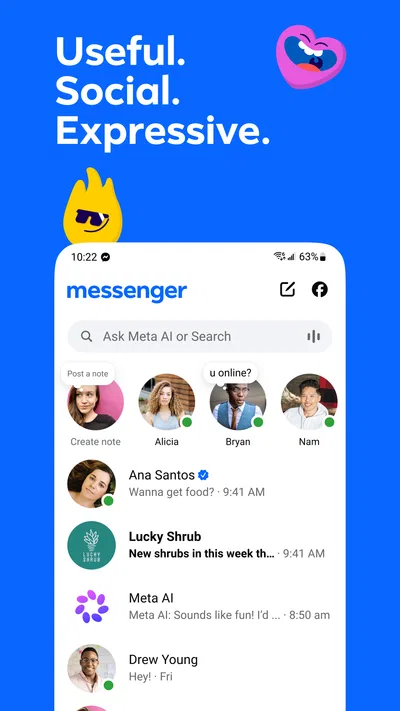
Useful. Social. Expressive.
Frequently Asked Questions
What is Messenger, and what can you do with it?
Messenger is Meta’s messaging app for communicating through text chats, voice messages, voice calls, and video calls. You can send photos, videos, stickers, and other shared content, and create group conversations with friends or family. Available features can vary by device, region, account, and app version, so check the current app listing and settings to see which options are supported for you.
Do you need a Facebook account to use Messenger?
Account requirements can depend on your location and the current version of Messenger. In some cases, Messenger access is connected to a Facebook account; in others, users may be able to sign in with a phone number or another supported method. Before installing, check the sign-in options shown in the app store listing or on the login screen, and review Meta’s latest account requirements.
Is Messenger free to download and use?
Messenger is generally free to download, and its basic messaging and calling features do not usually require a subscription. However, using the app requires an internet connection, and your mobile carrier may charge for data, especially when sending media or making calls away from Wi-Fi. Some optional features or services may have separate terms, so review any in-app purchase details before confirming a payment.
Can you make voice and video calls with Messenger?
Messenger supports voice and video calls in many regions and on compatible devices. Call quality depends on your internet connection, device, and the other person’s availability; a weak connection can cause delays or interruptions. Calls made over mobile data may use your data allowance. Check your device permissions and app settings if calling features are unavailable, and confirm that the person you want to contact can use Messenger.
What privacy and permissions should you consider before installing Messenger?
Messenger may request permissions such as access to your microphone, camera, photos, or contacts to support calling, sharing media, and finding people. You can review and change many permissions in your device settings, although denying one may limit related features. The app’s privacy controls and data practices can change, so read the current privacy information and adjust who can contact you and what information is visible.

Download Messenger
Similar apps
View all 9.2
WhatsApp Messenger
Communication
 7.6
Telegram
Communication
 8.4
Snapchat
Communication
 9.2
TextNow: Call + Text Unlimited
Communication


