
- Award score
- 4.7Rating
- 10,000,000+installs
- Free
App information
Screenshots


 Analysis byAppsAward
Our review of Fever: Events & Tickets
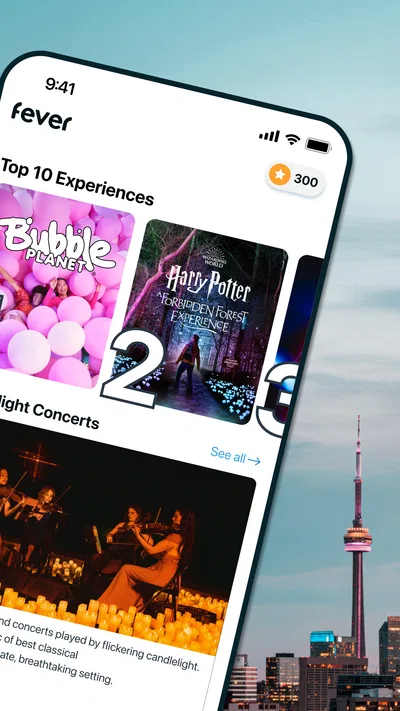
I think Fever makes the most sense when you treat it as a discovery tool, not just a place to buy tickets. Its focus is on experiences and events in cities including New York, Los Angeles, Chicago, Washington, DC, and Miami, so it can help when you know you want to go out but have not decided what to do. I’d use it to turn a vague “let’s make plans” into a shortlist worth discussing, then check the details carefully before committing.
Finding a plan without starting from scratch
The basic routine is simple: open Fever, browse what is available around your city, and compare ideas that suit your time and mood. That is a different starting point from searching for one specific concert or venue. The app is more useful when your question is “What could we do this weekend?” than “Where do I buy a ticket for this event I already chose?”
That distinction matters because event discovery can otherwise become a chore. You might search several venue calendars, ticketing services, and local guides, only to find that each covers a different slice of the city. Fever gives you a single place to begin exploring. I would still use other sources when I have a particular artist, venue, or event in mind, but for browsing across kinds of experiences, this is the more natural first stop.
A realistic use case is planning a date night after work. Instead of sending a string of vague suggestions, I’d look through the available options, pick a few that fit the evening, and share those with the other person for a quick decision. The benefit is not that every listing will be a perfect match; it is that the app gives you concrete possibilities to react to. That can make group planning less circular.
Fever is an events app developed by Fever Labs. It is free to install, has a Teen content rating, and has been available since March 19, 2014. Its scale is substantial: it has more than 10 million installs, a 4.7 average rating, and around 144,000 ratings. Those figures suggest that it is a well-established option, though popularity alone does not tell you whether a specific event suits your plans.
Make the first search useful
When I’m browsing, I’d begin with the practical constraints I already know: the day, the people coming along, and the kind of evening I want. A lively night out with friends calls for a different shortlist from an easy plan with family. Thinking this way helps prevent the familiar trap of saving several attractive ideas that turn out to be wrong for the occasion.
It also helps to decide whether you want inspiration or a near-final plan. If you are only exploring, broad browsing is useful; if you need to coordinate with others, narrow the list before sending it around. A shortlist of a few genuinely different options is easier to discuss than a long scroll of possibilities. I find that small habit more valuable than trying to inspect every listing in one sitting.
Before choosing, read the event information as a planning document, not just a pitch. Check the date and timing, where it takes place, and whether the experience sounds appropriate for everyone in your group. The exciting idea is only one part of a good night out; travel time, schedule, and the company you are bringing can matter just as much.
Settings and details worth checking
I would spend a moment getting comfortable with the app’s location and browsing context before relying on it for a plan. Fever serves multiple cities, and the recommendations are only useful if you are looking at the place where you can actually attend. If you travel, make a deliberate habit of checking the city shown before you start comparing events; otherwise, an appealing result can be irrelevant to the evening you are organizing.
Likewise, check the event details each time rather than assuming that an item you saw earlier still matches your plans. Dates and availability are central to ticketed experiences, and a listing that looked promising during a quick browse deserves a closer read before you invite people or arrange transport. I wouldn’t treat a saved memory of a listing as a substitute for confirming the current information in the app.
One useful trade-off is how much personal context you want to share with any discovery app. If you are comfortable using location-related browsing, it can make nearby options more relevant; if you prefer to plan without that context, you can still approach the app as a catalogue and evaluate events by their details. Either way, I’d avoid assuming that a recommendation is automatically the closest, cheapest, or most suitable choice. Read what is shown and make the decision yourself.
Fever is free to download, but that does not mean every outing found inside it will be free. Think of the app as a way to discover and arrange experiences, not as a promise that admission costs nothing. Before you settle on an option, inspect the purchase information and make sure the total fits your group’s budget. That is especially important when several people are deciding together, since a plan that seems affordable for one person may not work for everyone.
Repeatable habits that save planning time
Experienced use is less about secret shortcuts and more about repeating a sensible process. I’d browse when I have enough time to compare, keep a short list of candidates, and return to the details when the group is ready to decide. This separates exploration from commitment. It also reduces the chance of purchasing in a rush just because one listing caught my eye first.
For a weekend with friends, I’d ask everyone for one constraint before searching: a preferred day, a rough budget, or the sort of atmosphere they want. Then I’d use Fever to find options that satisfy those constraints, rather than asking the group to choose from an unfiltered stream. This is a small but practical improvement: it turns browsing into a decision process and keeps the app from becoming another source of indecision.
If I were visiting a city, I’d use the same routine in two passes. First, browse for experiences that make the trip feel distinctive. Later, check the event schedule against the rest of the itinerary and the location of other plans. That prevents choosing something appealing in isolation but awkward in the context of the day. Fever can help generate the idea, while a map and a calendar remain useful companions for logistics.
For a spontaneous evening, I’d keep the process even tighter: decide what time window is realistic, look for an option that fits, and inspect the listing before getting everyone excited. The app’s discovery angle is helpful here because it can surface a plan you might not have searched for by name. But spontaneity still works better when you confirm the essentials first, especially if the group has limited time to get across town.
Where discovery helps—and where it does not
Compared with a venue’s own calendar, Fever is better suited to exploring a range of experiences in one place; a venue calendar is usually the clearer choice when you already know exactly where you want to go. Compared with a general search engine, Fever offers a more event-focused starting point, while broader searches can be stronger for checking independent coverage, transport, or background information. I see the app as a useful layer in the planning process, not a replacement for every other tool.
That distinction is also a good way to avoid over-trusting a recommendation. An event can look appealing in a discovery feed and still be a poor match for your group, schedule, or preferred style. Read beyond the thumbnail and title. If the description does not answer the questions that matter to you, pause and look for reliable details before buying. A little extra checking is preferable to discovering the mismatch after plans are fixed.
The app is less compelling for someone who wants a complete local calendar covering every small community gathering, or who always begins with a named performer or venue. In those cases, specialized venue pages, local newsletters, or a search focused on that exact interest may be more direct. Fever is at its best when you are open to alternatives and want help finding experiences you did not already have on your list.
Limits to keep in mind before buying
Discovery has an inherent limitation: what appears in the app is not the same thing as everything happening in a city. I would not use Fever alone to judge whether a particular weekend has no suitable events. If the options do not fit, widen your search through local sources rather than assuming the city has nothing else to offer. That is a sensible fallback, not a failure of the app.
There is also a difference between finding an event and deciding whether it is right for you. A strong presentation can make an experience seem more appealing than its practical details warrant. Check the schedule, location, and audience suitability, and make sure the plan works for the people attending. This is especially important when booking for a group, since preferences and accessibility needs may not be obvious from a quick browse.
Version 5.251.1 is the current release, and the minimum operating-system requirement is version 7.0. Those details make it straightforward to assess basic device compatibility, but the more important question is whether the app’s discovery-led approach matches how you make plans. If you prefer to research every option across multiple sources before deciding, Fever can contribute ideas without becoming your sole reference.
The app has around 4,100 written reviews alongside its broader rating base, and its average is 4.7. I’d take that as encouraging context, not a guarantee that every booking or event will meet an individual expectation. Reviews can help set expectations, but the event’s own description and practical details should guide your decision. The most reliable habit is to treat ratings as one clue rather than the final word.
Who I’d recommend it to
I’d recommend Fever to people who enjoy going out but do not want to begin every plan with a blank search bar. It is particularly handy for couples, groups of friends, and visitors who want a way to browse experiences across major cities such as New York, Los Angeles, Chicago, Washington, DC, and Miami. If you like comparing several kinds of outing before choosing, its focus is a good fit.
I would be more cautious about recommending it as the only planning tool to someone who needs exhaustive local coverage, has a very specific event in mind, or is especially sensitive to the details of price, timing, and travel. Those users should pair discovery with direct checks from relevant venues and other reliable sources. The extra step is worthwhile when the plan has little room for error.
My overall view is that Fever is a practical way to get from “we should do something” to a manageable set of real possibilities. Its strongest use is discovery, supported by a careful habit of checking the listing and coordinating around the group’s constraints. Use it to spark the plan, not to make the decision for you, and it can be a helpful companion for arranging a night out or making better use of a visit to a city.
Pros
- Browse concerts and local events in one place.
- Discover events through recommendations based on your interests.
- Buy tickets directly through the app.
- Save events to keep track of plans.
- Find event details such as dates and venue information.
Cons
- Event availability depends on your location.
- Some listings may have limited details.
- Popular events can sell out quickly.
- Ticket fees may increase the final price.
- Refund and resale options vary by event.
Best Events App 2026
Our verdict
Discover events & experiences in NYC, LA, Chicago, DC, Miami and more!
Frequently Asked Questions
What is Fever: Events & Tickets, and what kinds of experiences can I find on it?
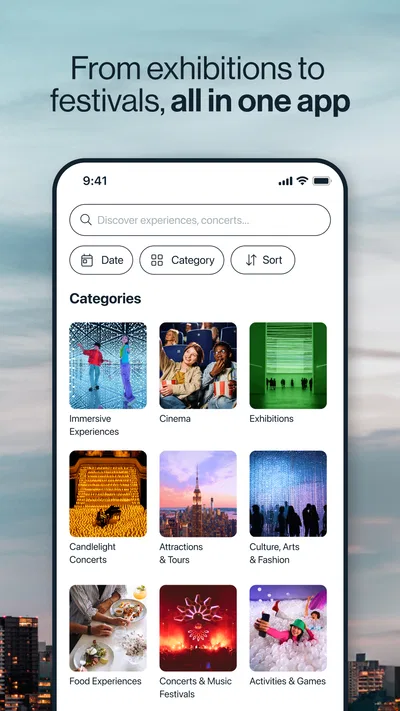
Fever is an events discovery and ticket-booking app that helps you find activities in your area or at destinations you plan to visit. Listings may include concerts, exhibitions, immersive shows, food experiences, nightlife, and family-friendly events. What appears depends on your location and the dates selected, so check the event description, venue, age guidance, and schedule before booking.
How do I find an event and buy tickets through Fever?
You can browse recommendations or search by location, date, and category, then open an event listing to review its details and available sessions. Select the ticket type and time that suit you, and follow the checkout instructions in the app. Before paying, confirm the number of tickets, date, venue, fees, and any entry requirements shown for that particular event.
Can I get a refund or change the date of a Fever ticket?
Refunds and date changes depend on the event’s terms, ticket type, and local policies; they are not guaranteed for every booking. Read the cancellation and exchange conditions on the listing and in your order details before purchasing. If your plans change, check the booking in the app for available options or contact Fever support promptly, since deadlines and eligibility may apply.
How do I use my Fever tickets at the event?
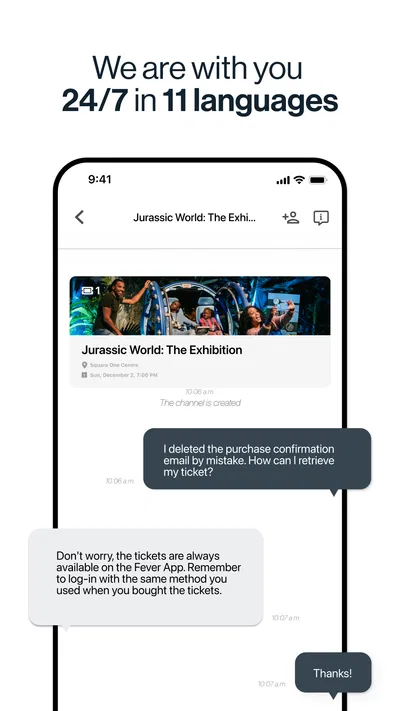
After booking, your tickets and order information are generally available in the app under your account or bookings. Open the correct event before arrival and follow the entry instructions, which may specify a digital ticket, QR code, time slot, or identification. Make sure your phone is charged and check whether tickets can be accessed offline; requirements can differ between venues and events.
Is Fever: Events & Tickets free to use, and what should I know about privacy?
You can typically download and browse Fever without an upfront app fee, but tickets and experiences cost extra, and applicable taxes or booking fees may be shown at checkout. The app may request information such as location to personalize nearby recommendations, while account and purchase details support bookings. Review the current privacy policy and device permissions, and share only the information needed for your use.

Download Fever: Events & Tickets
Similar apps
View all 8.6
 9.5
 9.0
 9.6


