- Award score
- 4.6Rating
- 10,000,000+installs
- Free
App information
Screenshots

 Analysis byAppsAward
Our review of Domino's Pizza USA
If you’re hungry and already know you want Domino’s, the Domino’s Pizza USA app offers a direct way to put an order together and keep an eye on its progress. I find its appeal less about discovering food in general and more about making a familiar pizza order easier to manage. For a first-time user, the reassuring part is that the app is focused: choose what you want, review the order carefully, and use the in-app progress updates rather than wondering what happens after checkout.
What to expect from the ordering experience
Domino’s Pizza USA is a free Food & Drink app from Domino’s Pizza LLC, built for ordering from the chain rather than browsing restaurants across town. That distinction matters. If you’re deciding between several nearby takeout places, a delivery marketplace may be more useful; if you’ve settled on Domino’s, going straight to its own app keeps the experience centered on that menu and the order you’re placing.
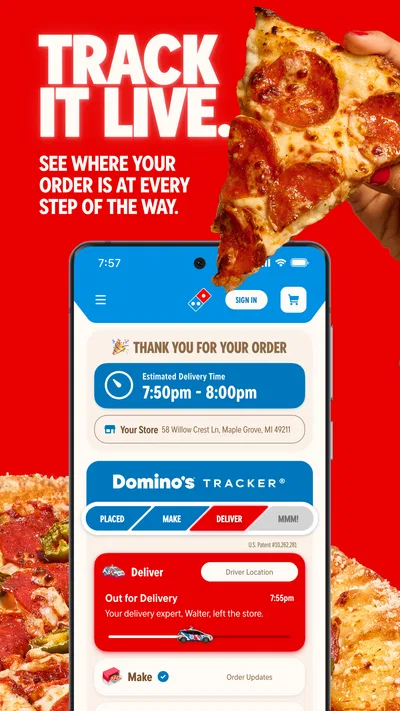
The app’s signature practical benefit is the Domino’s Tracker, which lets you follow order progress after placing it. I like that this gives the experience a clear second half: ordering isn’t the only task, because you can check what’s happening instead of treating checkout as the end of the interaction. It is still a progress tool, not a guarantee that every stage will move at a perfectly predictable pace. I’d use it to stay informed, not to plan a minute-by-minute arrival.
The audience numbers suggest that this is a well-established option: it has a 4.6 average from around 2.4 million ratings and has passed 10 million installs. Those figures can offer some reassurance that many people use it, but they don’t tell you whether a particular store, menu choice, or delivery situation will suit you. My advice is to judge it by the simple question that matters: does ordering directly from Domino’s make this meal easier for you?
The app is rated Everyone, and its current version is 13.11.3. It first appeared on February 21, 2012, and supports devices running Android 9 or later. Those details make it easier to decide whether it fits your phone before you get started. The price is free, so trying it doesn’t require paying for the app itself; your food order is a separate matter.
Who will get the most from it
I’d recommend it to someone who orders Domino’s often, knows the chain’s menu, or wants to check an order’s progress in one place. It also makes sense when you’re ordering for a household and need to take a moment to settle on a combination before submitting. The direct-to-chain setup can feel more straightforward than a general delivery app when the restaurant is already chosen.
On the other hand, I wouldn’t make this my first stop if I wanted to compare independent pizzerias, weigh different restaurants’ delivery options, or browse a broad local food scene. It is not a substitute for a multi-restaurant marketplace. And if you prefer calling a store because your order needs a detailed conversation, an app may not be the best route for that particular meal.
Getting set up without overthinking it
For a first order, I’d begin by opening the app and checking that I’m using the U.S. Domino’s experience, since this is Domino’s Pizza USA rather than a general-purpose ordering service. Then I’d take a few seconds to confirm the order method and the location details shown during the ordering flow before choosing food. That small pause is useful: a carefully built cart is no help if it is associated with the wrong place or intended handoff.
Next, browse with the actual meal in mind instead of trying to explore every menu choice. If you’re ordering for yourself, decide whether you want a full meal or something to share. If you’re feeding a group, agree on the main order first and handle individual preferences before checkout. I find that setting the plan before tapping through options reduces the familiar problem of adding items impulsively and then having to rebuild the cart.
One practical tip is to treat the final review as part of setup, not a formality. Check the items, quantities, and order details together before submitting. This is especially helpful when several people have weighed in, or when you have changed your mind while browsing. A quick read-through catches mismatches while they are still easy to fix, rather than after you are waiting for the order to progress.
You don’t need to make a complicated routine out of the first visit. The useful goal is simply to reach a clear, correct order and understand where its progress will appear. If you are comfortable with the details shown in the app, proceed; if something looks wrong, stop and sort that out before placing the order. That is a calmer approach than assuming a later screen will automatically resolve an earlier uncertainty.
Your first meaningful success: place one clear order
A realistic first use might be a weeknight when you get home late, the family has agreed on pizza, and nobody wants to spend time calling around. I’d open the app, choose the order that matches the group’s decision, double-check the details, and submit only when the cart reflects what everyone expects. The first success is not learning every corner of the interface; it is completing a straightforward order without confusion.
Afterward, use the Tracker to follow the order’s progress. This is where the app becomes more than a digital menu: it gives you a place to check in while the order moves along. My tip is to check it when you genuinely need an update rather than repeatedly refreshing out of impatience. The status can help you understand where things stand, but it is better not to treat it as an exact promise about when you can serve dinner.
For a shared order, the most helpful workflow is to gather preferences before one person starts tapping. Ask about the main choices and any must-have details, then let one person review the final cart. This avoids a common source of friction with group ordering: the person holding the phone becomes the decision-maker by default, even when other people are paying attention. A short verbal check before checkout can make the app experience smoother than hurriedly editing the order at the last moment.
If the meal is for a specific occasion or timing matters, place the order with enough flexibility to handle ordinary uncertainty. I would not use a progress tracker as the sole basis for a tight schedule. For an informal dinner at home, seeing progress is useful; for a hard deadline, calling the store or choosing a plan with more control may be the wiser option if the app’s flow does not give you the confidence you need.
Where first-time users can get confused
The biggest potential misunderstanding is expecting a tracker to answer every question about the order. Its job is to show progress, not to replace careful order review or guarantee an exact arrival time. If the status has not changed as quickly as you hoped, I’d avoid assuming that the order failed or submitting a duplicate. First check the order information already available in the app, then use an appropriate direct contact route if you need clarification.
Another point to keep in mind is that this is a brand-specific app. A familiar Domino’s experience does not mean it can compare the chain’s offer with a neighboring pizza shop or show you an entire city’s options. People sometimes install a restaurant app expecting the breadth of a delivery marketplace; that mismatch can make a perfectly focused app feel limited. If you want choice across restaurants, begin with a broader service instead.
It can also be easy to confuse app cost with meal cost. The app is free to download, but that does not make an order free. I’d focus on the total and order details presented during the checkout process, rather than assuming that using the chain’s own app removes the need to review what you’re buying.
Finally, a polished digital order cannot solve every special request. If what you need depends on explaining a complicated situation or confirming an exception, I would not rely on guesswork in the app. Choose the path that lets you communicate clearly, even if that means using a different way to order. Convenience is only useful when it still leaves you confident about what will arrive.
How it compares with other ways to order
Compared with calling, the app gives you a visual way to assemble and check a Domino’s order, then follow progress through the Tracker. That can be easier when you already know what you want and prefer to review the cart yourself. A phone call may be better when you need a conversation, want to clarify an unusual request, or feel more comfortable speaking directly with the store.
Compared with a multi-restaurant delivery service, Domino’s own app narrows the choice to one chain. That is a limitation if your first priority is comparing restaurants, but an advantage if you have already decided on Domino’s and want a focused route to ordering. I’d choose between them based on the decision you still need to make: if it’s “which restaurant?”, use a broader option; if it’s “what should I order from Domino’s?”, this app is the more natural fit.
There is also the option of visiting a store in person. That may suit someone who wants to handle the order face to face, but it gives up the convenience of placing the order from wherever they are and checking its progress on the phone. The app is most compelling when those two conveniences matter more than browsing several businesses or discussing the order at length.
After your first order
Once you have completed one successful order, the next step is to decide whether the app fits your habits. If Domino’s is a regular choice, having a dedicated way to order and check progress may be worth keeping on your phone. If you only want pizza occasionally and usually compare several local options, it may be simpler to open a general marketplace when the craving comes around.
I’d also carry forward the habits that prevent avoidable mistakes: confirm the order details before submitting, make sure the intended location and method are clear, and treat progress updates as guidance rather than a precise clock. These are small steps, but they matter more than learning every menu path. They make the app useful without asking you to trust it blindly.
Overall, I see Domino’s Pizza USA as a practical, focused ordering app rather than a complete food-discovery tool. Its strongest case is a familiar Domino’s meal, a clear cart, and the convenience of tracking what happens after checkout. Its limits are just as straightforward: it cannot replace a broad restaurant comparison, and an app-based workflow may not suit an order that needs a detailed conversation. If you know you want Domino’s, I’d give it a try; if you are still deciding where to eat, start somewhere broader.
Pros
- Order pizza and sides for delivery or pickup in one place
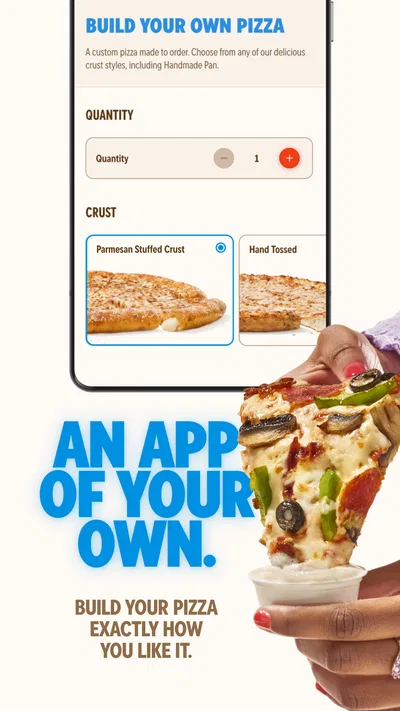
- Customize toppings and crust before adding a pizza to your order
- Save favorite orders for quicker repeat purchases
- Track an order through preparation and delivery
- Find nearby Domino's locations with store hours and contact details
Cons
- Menu choices and prices can vary by location
- Delivery availability depends on your address and local store
- Promotions may have eligibility rules or minimum order requirements
- Accurate order tracking depends on updates from the local store
- Some orders may include service or delivery fees
Best Food & Drink App 2026
Our verdict
Order your Domino's favorites then follow the progress with Domino's Tracker®!
Frequently Asked Questions
What can I do with the Domino’s Pizza USA app?
The Domino’s Pizza USA app lets you browse the menu, customize eligible pizzas and other items, place orders for delivery or carryout, and check available deals. You can also review order details and follow progress through Domino’s Tracker when that feature is available for your order. Menu items, promotions, payment options, and services can vary by location, so confirm the details shown for your selected store before ordering.
Can I use the app to order delivery or carryout from any Domino’s location?
The app can help you find a participating nearby store and place a delivery or carryout order, but availability depends on your address and the location’s operating hours and service area. Enter your address or choose a store before building your order, then check the estimated timing and pickup or delivery details at checkout. Some locations may offer different menu items or ordering options.
How do Domino’s deals and coupons work in the app?
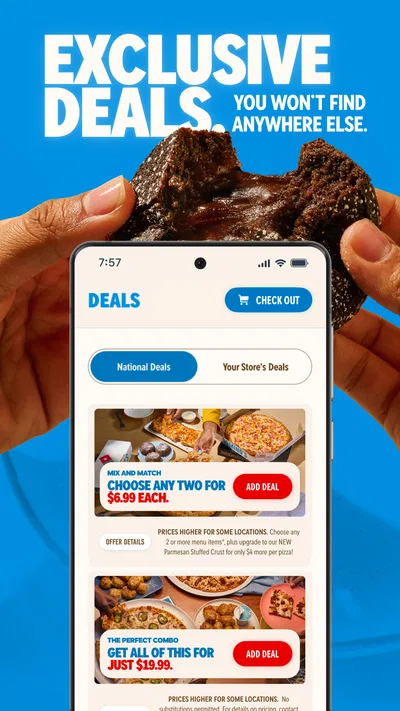
The app may show current offers and allow you to apply eligible coupons to an order, but promotions are subject to their terms, participating locations, and availability. Read each offer’s requirements, including qualifying items, minimum order amounts, and whether it can be combined with another deal. Prices and offers can differ by store, and an offer may no longer be available when you place your order.
Can I customize my food and track my order in the Domino’s app?
Many menu items offer customization choices, such as selecting toppings or changing certain ingredients, though the options depend on the item and store. Before submitting, review the order summary to make sure your selections are correct. Domino’s Tracker may show progress after an order is placed, but its stages and timing are estimates and can vary; contact the store if you need help with a specific order.
Is the Domino’s Pizza USA app free, and what should I know before downloading it?
The app is generally free to download, but food, delivery charges, taxes, and other applicable fees are not included in the download and are shown during ordering. You’ll need an internet connection to browse and submit orders, and some features may require account details or location information. Check the app-store listing for current device compatibility, permissions, and privacy information before installing.

Download Domino's Pizza USA
Similar apps
View all 9.3
Uber Eats: Food and Grocery
Food & Drink
 9.3
DoorDash: Food, Grocery, More
Food & Drink
 7.9
McDonald's
Food & Drink


