
- Award score
- 4.7Rating
- 5,000,000+installs
- Free
App information
- Version
- 13.0.0.4.159
- Updated
- Requires
- 10
- Price
- Free, in-app purchases
- Developer
- Meta Platforms, Inc.
- Content rating
- Teen
Screenshots





 Analysis byAppsAward
Our review of Muse from Meta
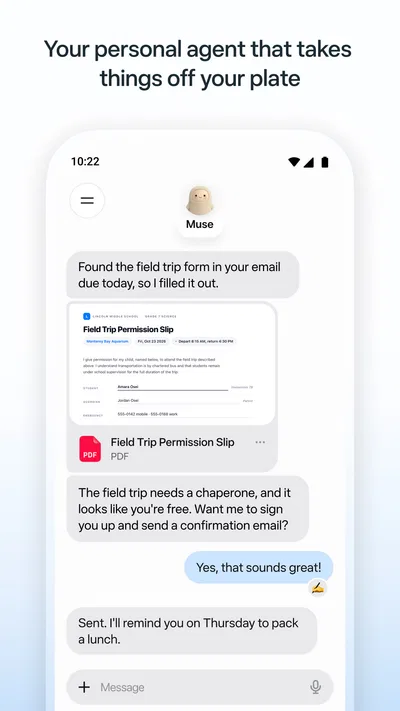
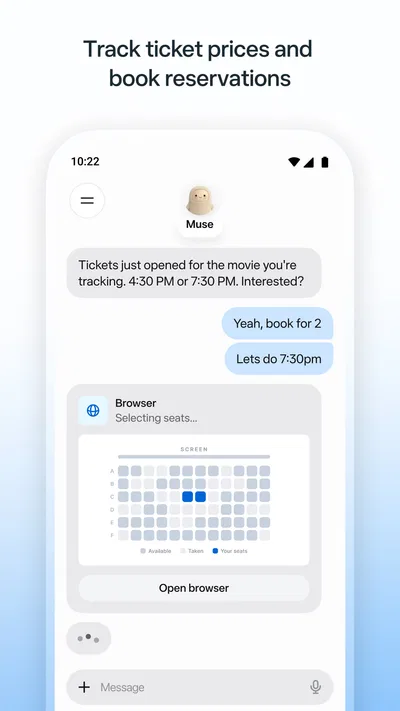
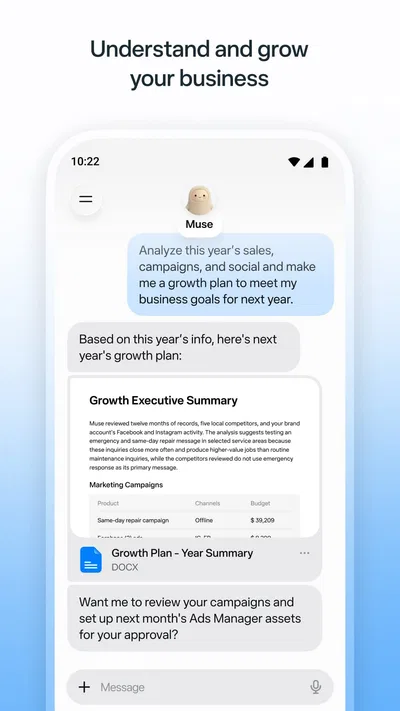
I can see the appeal of Muse from Meta most clearly in a household where people share a device or regularly help one another with small tasks. A personal AI can be handy for turning a vague request into a draft, organizing thoughts, or finding a starting point when everyone is busy. But “personal” matters here: I would treat Muse as an assistant for the account using it, not as a shared family notebook or a reliable coordinator for everyone under one login.
Where Muse fits into a shared household
Picture a common evening: one person is planning tomorrow, another needs help wording a message, and someone else is trying to make sense of a list of errands. Muse may be useful as a place to work through those separate requests, especially when the goal is to get from a blank page to something practical. I like this kind of assistance best when the person using it stays involved, checks the result, and decides what to do next.
That distinction is important in a shared-device setting. If several people take turns with the same phone or tablet, they should not assume that one person’s conversations, context, or preferences are automatically kept separate from another’s. I would make the account boundary clear before anyone starts using an AI assistant on a device that others can pick up. For household planning, a shared calendar, notes app, or family chat is still the more dependable place to keep information everyone needs to see.
My practical approach would be to use Muse for individual thinking and drafting, then move only the reviewed result into a shared tool. For example, I might ask it to help shape a polite message about changing a pickup time, edit the wording myself, and send the final version through the usual channel. That keeps the assistant useful without making it the source of truth for a household schedule.
Make the account boundary clear before sharing a device
Before handing a device to another person, I would check which account is active and whether the app is open to a conversation that should remain private. This is an ordinary but easy-to-miss precaution with any personal productivity app. A shared screen can reveal more than intended, even when nobody is trying to access someone else’s information.
I would also avoid treating a single account as a family profile. Separate people often have different writing styles, priorities, and levels of comfort with AI assistance. If each person is using the same account, the experience can become muddled: a request may be interpreted without the right context, and one person’s earlier work may be visible to the next. If keeping individual work separate is essential, a setup that gives each person a distinct account or device is the safer choice.
There is a useful workflow here for a parent, partner, or roommate helping someone get started: demonstrate one low-stakes task, explain that AI output needs a human check, and then let the other person decide what they want to use it for. I would not make the assistant the default place for sensitive household details. The more personal the information, the more carefully I would consider whether it belongs in an AI conversation at all.
Useful for coordination, but not a shared command center
Muse can play a supporting role in coordination by helping one person clarify a plan or prepare a message. That is different from managing the plan itself. A household still needs a place where dates, responsibilities, and changes are visible to everyone who depends on them. I would not rely on an AI conversation as the only record of who is doing what, particularly when plans involve several people or can change at short notice.
A concrete example: suppose two adults are dividing errands before the weekend. One person can use Muse to turn a scattered set of thoughts into a concise checklist or draft a message proposing who handles each task. The useful next step is to confirm the arrangement in a shared list or chat, where everyone can see the final version. This two-step method reduces the chance that a helpful draft is mistaken for an agreed plan.
Another worthwhile use is preparing a message that needs a particular tone. I might ask for a softer or clearer version, then compare it with my own wording rather than copying it blindly. The trade-off is that an assistant’s polished phrasing can sound more certain or formal than the situation calls for. For family discussions, I would keep the final message recognizably mine and make sure it says what I actually mean.
Compared with a standard notes app or shared calendar, Muse is better suited to helping formulate and refine ideas than to maintaining a household’s records. Compared with a general search or a conventional productivity tool, an AI assistant can be useful when I know the problem but not how to phrase the first step. Those tools are not interchangeable: for reminders and shared facts, use the calendar or list; for drafting and thinking through a request, Muse may be a more natural starting point.
Teen rating calls for thoughtful use, not assumptions
Muse has a Teen content rating, so I would take age into account when deciding whether it is appropriate for a younger person in my household. A rating is a useful signal, but it does not replace a conversation about what the app is for, how to judge answers, and what information should stay private. I would introduce it with a clear example and encourage a young user to ask a trusted adult when an answer affects a meaningful decision.
For adults, the main trust question is also practical: does the assistant’s response help me think, or am I treating it as an authority? I would use it to generate options, improve a draft, or organize a complicated thought, then verify important details elsewhere. That is especially sensible when the outcome could affect another family member. A smooth answer can still be incomplete, and confidence in the wording is not the same as confidence in the facts.
Families should also be candid about who is using the app and whose account is involved. I would not quietly install it on a shared device and assume everyone understands what they are opening. A brief explanation of account ownership and basic privacy expectations is more useful than pretending the app itself will sort out household boundaries.
What the rating and cost suggest at a glance
As a free productivity app from Meta Platforms, Inc., Muse has drawn a 4.7 average from around 115,000 ratings, with more than 19,000 written reviews and over 5 million installs. Those figures make it a well-established option rather than an obscure experiment, but they cannot tell me whether its style will suit my own tasks. I would judge it by trying a few ordinary prompts and checking whether the responses genuinely save effort.
The app is free to install, while in-app purchases range from $0.99 to $1,049.00 per item. That is a broad span, so I would look carefully at any purchase screen and make sure I understand what an item offers before confirming anything. For a household, that also means being thoughtful about who can make purchases on a device. The free starting point makes it easier to explore, but it does not mean every optional item is a small or routine expense.
The current version is 13.0.0.4.159, and the listed minimum operating-system version is 10. I would check device compatibility before asking someone else in the household to install it, especially if they use an older phone or tablet. That quick check avoids turning a recommendation into a frustrating setup problem.
Who I would recommend it to—and who should choose something else
I would recommend Muse to someone who wants an AI assistant for personal productivity: a person who often needs help getting started, shaping a message, or sorting a loose idea into a more usable form. It is also a reasonable choice for a household member who is comfortable checking AI output and wants a private workspace for their own tasks. The strongest fit is someone who sees the assistant as a helpful first pass, not as a replacement for their judgment.
I would be less inclined to recommend it as the central tool for family coordination. If the main need is assigning chores, sharing reminders, tracking appointments, or keeping a record that several people can edit, a dedicated shared calendar or list is a better match. If a user wants answers that can be accepted without review, or expects an AI to make decisions on behalf of the household, I would suggest a more cautious approach instead.
It may also be a poor fit for anyone who dislikes conversational AI or does not want to manage account boundaries on a shared device. A traditional notes app can be simpler when all someone needs is a place to store a grocery list. A calendar is clearer for time-sensitive plans. Muse earns its place when the hard part is composing, reframing, or organizing—not when the task is simply recording a fact for everyone to follow.
My household verdict
My overall view is positive, with a clear boundary around what I expect it to do. Muse from Meta can be a useful personal productivity companion in a busy home, particularly for turning rough thoughts into drafts and helping one person prepare for a conversation or task. Its value is less convincing when several people need one shared source of truth, because that job belongs to tools designed for shared records and coordination.
If I were introducing it at home, I would start with one person, one account, and a low-stakes task. I would keep important plans in the household’s existing shared system, check AI-generated text before sending it, and talk openly about privacy and age-appropriate use. Used that way, Muse can make individual work feel easier without creating confusion about who knows what or which plan is final. That is the balance I would want from an AI app in a shared household.
Pros
- Explore immersive 360-degree videos and virtual environments.
- Use hand tracking for controller-free interactions.
- Connect with friends in shared virtual spaces.
- Access fitness and entertainment experiences in VR.
- Choose from a broad catalog of compatible VR apps.
Cons
- Requires a compatible Meta Quest headset.
- Some experiences need additional purchases or subscriptions.
- Comfort can vary during extended VR sessions.
- Hand tracking may be less precise than controllers.
- Availability of features can vary by region and device.
Best Productivity App 2026
Our verdict
Your personal AI agent
Frequently Asked Questions
What is Muse from Meta?
Muse is Meta’s AI-powered social app for discovering and sharing visual content, especially photos and videos. It is designed to help people explore posts tailored to their interests and interact with a community around creative topics. Features and availability may change as Meta develops the app, so check its current store listing and in-app information to see what is offered in your region.
Is Muse from Meta available on Android and iOS?
Availability can depend on your country, device, and the app’s current release status. Before downloading, search for Muse from Meta in the official Google Play Store or Apple App Store and verify that the publisher is Meta. If it does not appear, it may not be available for your region or device yet; avoid unofficial download files that could pose security risks.
Do I need a Meta account to use Muse?
Muse may use Meta account services for sign-in or connections with other Meta products, but account requirements can vary as the app changes. Review the sign-in screen and official app information before creating an account. If you connect an existing account, check which profile details, contacts, or other information may be shared and adjust available privacy settings to suit your preferences.
Is Muse from Meta free to download and use?
Check the official app-store listing for the latest pricing, since availability and business terms can change. An app may be free to install while still offering optional paid features or showing promotional content. Before confirming any purchase, review its price and renewal terms in the store. You should also consider mobile data use, particularly when browsing or uploading photos and videos.
What privacy and safety settings should I check before using Muse?
Because Muse centers on sharing and discovering visual content, review its privacy controls before posting. Check who can see your profile and posts, whether interactions are public, and how to block, report, or mute accounts. Read the current privacy notice to understand how Meta handles account and activity data, and avoid sharing sensitive personal details in photos, captions, or conversations.




