
- Award score
- 4.8Rating
- 10,000,000+installs
- Free
App information
- Version
- VARY
- Updated
- Requires
- Varies with device
- Price
- Free, in-app purchases
- Developer
- MIXI, Inc.
- Content rating
- Teen
Screenshots






 Analysis byAppsAward
Our review of FamilyAlbum - Photo Sharing
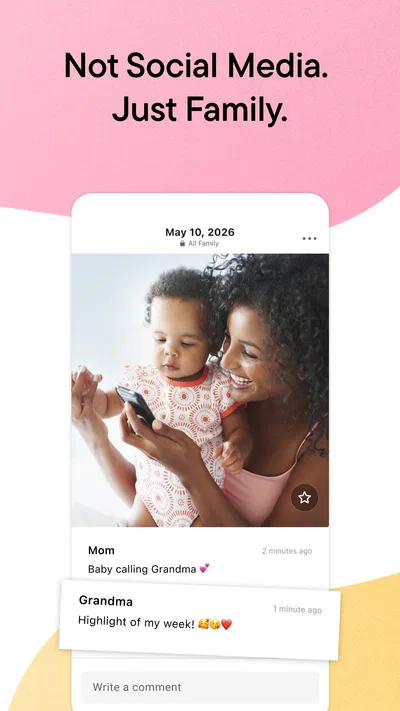
Sharing family photos sounds simple until everyone starts sending pictures through different chats, devices, and group threads. Important moments get buried, and not every relative wants family pictures mixed into a public-facing social feed. FamilyAlbum is built around a more focused idea: keeping family photos and videos together in a private space so people can revisit, organize, and share them. I like that clear purpose. Instead of trying to be an all-purpose social network, it puts family memories front and center.
A calmer place for family memories
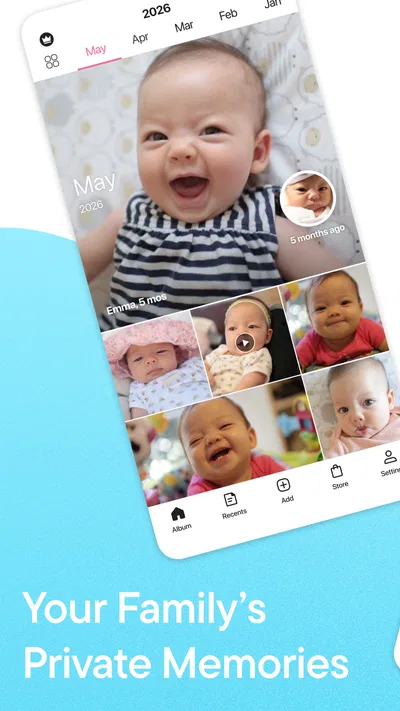
At its heart, FamilyAlbum is a family photo-sharing app for collecting pictures and videos in one place. That can make everyday life easier when parents, grandparents, and other family members all want to follow along without relying on scattered messages. The appeal is practical: a shared collection gives relatives a simple place to look back, rather than asking someone to resend a picture that disappeared in a chat history.
The app is free to download, and its audience is broad: it has passed ten million installs and has an average rating of 4.8 from around 366,000 ratings. Those figures suggest it has found a substantial audience among people looking for a dedicated family album. It is published by MIXI, Inc., and was released on April 14, 2015. The app is rated for teens, so families should still take a moment to review the age guidance and decide what works for their household.
My overall impression is that the concept succeeds when the family agrees on one shared routine. A photo album is only useful if people know where to add memories and where to find them later. FamilyAlbum’s focused purpose helps make that routine easier to explain: use this space for family pictures and videos, and come back when you want to relive them. That simplicity is more valuable than a long list of features that can make a family tool feel like another social platform to manage.
Where people can get stuck
The most common friction with any shared album is not necessarily the app itself; it is getting everyone onto the same page. One person may expect pictures to arrive automatically, while another assumes they must be added manually. A relative may also look in a familiar messaging app out of habit rather than opening a separate album. Before making FamilyAlbum the family’s main photo destination, I would tell everyone what it is for and agree on how they should use it.
It also helps to set expectations around participation. Some family members love sharing frequent updates, while others prefer to browse quietly or contribute only on special occasions. That difference can make a new album seem inactive even when it is working as intended. I would avoid treating the number of posts as a measure of whether the app is useful. The real value is having a shared place to keep and revisit memories at a pace that suits the family.
Another possible sticking point is sorting out who belongs in the family space. People often have different ideas about which relatives should see particular pictures. A quick conversation before inviting anyone can prevent awkwardness later. Think about the group as a family album rather than a public feed, and be considerate about what you share. The app’s private-family focus is appealing, but responsible sharing still depends on the choices people make.
For a household with several devices, small differences in habits can be confusing. One person might browse on a phone, another might prefer to wait until a convenient moment, and someone else may not be comfortable with new apps. I would make the first use low-pressure: show relatives where the shared memories are, explain the basic purpose, and let them explore without expecting everyone to become a frequent contributor. A tool that feels welcoming is more likely to become part of the family’s routine.
Getting started without unnecessary hassle
When setting up a family album, I would begin with the people and purpose, not with a rush to upload everything. Decide who will use it, what kinds of family moments belong there, and how often people are likely to check in. That small bit of planning can prevent a cluttered first impression and make the album feel useful from the start. If relatives understand the goal, they are less likely to mistake it for yet another feed demanding constant attention.
Next, make sure each person is using the correct app and has access to the family space they intend to view. If someone says the album looks empty, first check that they are in the right place and looking at the same shared collection as the rest of the family. It is a straightforward check, but it can save time and avoid assuming that a photo has vanished. When several relatives are involved, confirming the shared context is often more helpful than repeating the same action over and over.
I would also start with a small batch of pictures and videos rather than trying to reorganize years of memories in one sitting. A modest first contribution makes it easier to see how the album fits into daily life. Once everyone is comfortable, the family can decide whether to add older material or keep the collection focused on new moments. There is no need to turn setup into a major project; the best system is one people can maintain without feeling burdened.
Storage habits matter as well. If family members are choosing photos from different devices, it is worth checking that they have selected the images they actually want to share. A quick review before adding content can prevent accidental duplicates or pictures intended for a different audience. That is ordinary good practice for any shared photo space, and it supports the private, family-centered experience people are seeking.
FamilyAlbum is free, though in-app purchases are available, with listed prices ranging from $0.99 to $109.00 per item. I would keep that in mind when exploring the app and make purchase decisions deliberately. A family can begin by understanding the free experience and then decide whether any optional purchase makes sense for its needs. There is no reason to treat spending as a prerequisite for trying the basic idea of a shared album.
Recovering a photo-sharing workflow
If a picture does not appear where someone expects it, I would troubleshoot in a calm order. First, check whether the person is viewing the right family space and whether they are looking for the correct image or video. Then ask the person who shared it to confirm that they meant to add it to the shared album. These simple checks address common mix-ups without assuming that something has gone wrong behind the scenes.
If the family’s usual routine stops working, it can help to agree on one straightforward process again. For example, decide who will add pictures, when relatives should check the album, and how to handle older memories. Keep those instructions short and repeatable. A shared tool often becomes frustrating when everyone invents a different workflow, so a little consistency can make a noticeable difference even without changing any settings.
It is also sensible to try basic device troubleshooting when an app behaves unexpectedly. Confirm that the device is connected, close and reopen the app, and check whether the problem affects one person or several. If only one person is having trouble, the issue may be tied to their device or how they are accessing the album. If multiple family members notice the same issue, compare what each person sees before taking further steps. This approach helps narrow down the source without jumping to conclusions.
For a family member who is unsure how to use the app, a brief walkthrough may be more effective than a long explanation by text. Show them where the family memories are and let them try browsing at their own pace. If they want to share something, guide them through that task when they are ready. I find that the most successful family apps are not necessarily the ones with the most elaborate tools; they are the ones that people of different ages and confidence levels can comfortably adopt.
When a family album feels disorganized, pause before adding more content. A burst of uploads can make it harder to find a particular moment, especially if relatives are contributing without a shared convention. You can agree on a simple approach, such as keeping contributions tied to the family events everyone recognizes. The goal is not to impose strict rules on personal memories, but to make the collection pleasant to revisit.
When the app may not be the cause
Not every sharing problem begins inside FamilyAlbum. A photo may be difficult to locate because it is on another device, a relative may be looking at the wrong collection, or people may simply have different expectations about what has been shared. Before blaming the app, I would ask a few practical questions: who added the picture, when did they do it, and where is the viewer looking? A quick conversation can often reveal a mismatch in routine rather than a technical fault.
Network conditions and device behavior can also affect how smoothly people use any online service. If the app seems slow or does not respond as expected, check whether other online activities are working on that device. Restarting the app and trying again later can be reasonable first steps. If the problem persists, use the app store’s support options or the app’s available help resources rather than repeatedly uploading the same content. That avoids unnecessary duplicates and gives the family a clearer picture of what is happening.
Privacy expectations deserve attention too. A family may describe a space as private and still need to agree on what is appropriate to share and who should be included. Ask before adding people, be thoughtful about images of children and relatives, and remember that convenience does not replace good judgment. FamilyAlbum’s stated focus on private family memories is a strong starting point, but a respectful sharing culture comes from the people using it.
There can also be a social reason for low activity. Some relatives may enjoy looking at photos but not want to post their own, while others may prefer a different way to stay in touch. That does not automatically mean the album has failed. The right measure is whether it helps the family preserve and revisit moments in a way that feels comfortable. If it does, quiet participation can still be meaningful.
A practical verdict for families
I see FamilyAlbum as a useful choice for families who want a dedicated home for photos and videos, rather than another general-purpose social feed. Its promise is easy to understand: keep family memories together, make them easier to revisit, and share them with the people who matter. That focus gives the app a clear role, especially for relatives who would otherwise depend on scattered conversations to keep up with family life.
The experience will work best when the family sets expectations early, keeps the workflow simple, and remembers that not everyone shares at the same pace. A small start, a clear group, and a quick check when something seems missing can prevent much of the avoidable frustration. Those habits matter more than trying to make the album perfect from day one. If a problem appears, check the device, connection, and shared context before assuming the app is at fault.
FamilyAlbum has an average rating of 4.8 and more than 6,000 written reviews, which reflects strong enthusiasm from many users. Still, whether it suits your household depends on how your relatives prefer to share and revisit photos. I would recommend it to families looking for a focused private family album and willing to agree on a simple routine. For that use, FamilyAlbum offers a clear, approachable way to bring shared memories into one place without making the process feel like another daily obligation.
Pros
- Invite-only albums help keep family photos within a chosen group.
- Automatic sorting makes it easier to browse photos by date.
- Members can add comments and reactions to shared moments.
- The app supports sharing videos as well as photos.
- Grandparents can view updates without needing social media accounts.
Cons
- Free video uploads have duration limits.
- Some storage and printing options require a paid plan.
- Album members need an internet connection to see new uploads.
- Notifications may become frequent in an active family group.
- The app may use significant storage when saving many media files locally.
Best Parenting App 2026
Our verdict
Family memories made private. Relive, organize & share pictures & videos easily.
Frequently Asked Questions
What is FamilyAlbum, and how does photo sharing work?
FamilyAlbum is a private space for families to collect and share photos and videos, particularly memories of children. After creating an album, you can invite relatives to view or contribute, with access controlled by the account owner. The app organizes uploads by date and can make it easier to revisit milestones than searching through a busy group chat. Check the current app listing for the latest features and plan details.
Who can see the photos and videos in a FamilyAlbum?
FamilyAlbum is designed for sharing within an invited family group rather than publishing to a public social feed. The album owner manages invitations and can decide who is allowed to participate, so it is worth reviewing permissions before adding relatives or uploading sensitive images. Privacy settings and account options may change, and no online service can eliminate every security risk; avoid sharing information you would not want stored online.
Is FamilyAlbum free to use, or does it require a subscription?
FamilyAlbum offers free features, while some additional services or benefits may be available through paid plans, depending on the region and current offering. The exact limits, pricing, and included features can change, so check the subscription information shown in the app or your device’s app store before subscribing. If you start a trial or paid plan, review its renewal terms and cancellation instructions to avoid unexpected charges.
Can I use FamilyAlbum to save or download my family’s photos?
The app is intended to keep family photos and videos together and make them convenient to revisit, but available download, export, and storage options can depend on the feature, plan, device, and app version. Before treating it as your only archive, check how to save original files and whether any limits apply. Keeping a separate backup on a computer or trusted cloud service is a sensible precaution for important memories.
What should I know before installing FamilyAlbum on Android or iOS?
Before installing, confirm that your device meets the app store’s current operating-system requirements and that you have enough storage for the photos and videos you plan to upload. The app needs an internet connection for sharing and may request access to your photo library, camera, or notifications for relevant features. Review those permissions and the privacy information in the store listing, then invite only people you trust to your family album.

Download FamilyAlbum - Photo Sharing
Similar apps
View all 9.7
Pregnancy App & Baby Tracker
Parenting
 9.2
Speech Blubs: Language Therapy
Parenting
 8.1
Findio: GPS phone tracker
Parenting
 8.6
AppClose: Co-Parent Essentials
Parenting


