
- Award score
- 4.9Rating
- 10,000,000+installs
- Free
App information
Screenshots

 Analysis byAppsAward
Our review of Pregnancy App & Baby Tracker
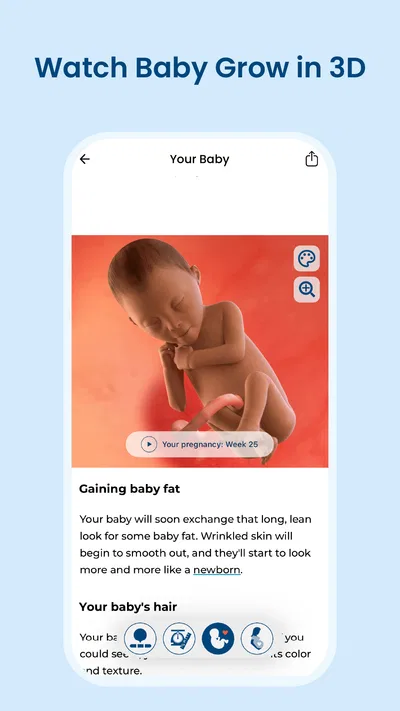
Pregnancy can turn a simple question into a whole search session: What is changing this week? Is this new sensation worth asking about? What should I keep track of before my next appointment? BabyCenter Pregnancy App & Baby Tracker is built around that early-to-late journey, with a clear central idea: follow a baby’s development and growth week by week while getting pregnancy information in one place. I find that focus reassuring. Instead of treating pregnancy as a pile of unrelated questions, the app gives you a recurring point to check in, learn, and prepare.
A week-by-week starting point
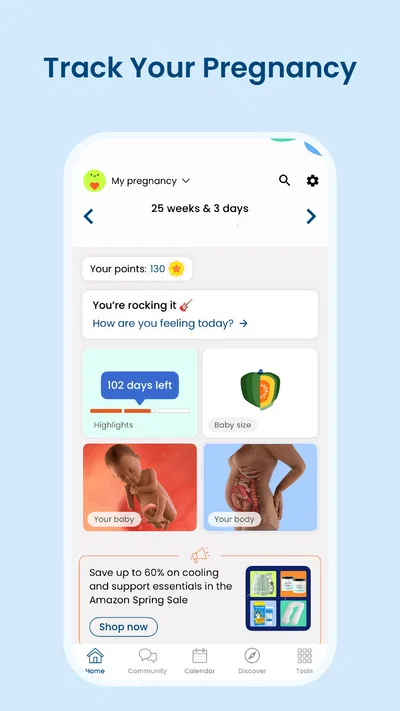
The first useful step is choosing to follow the pregnancy journey rather than trying to absorb everything at once. BabyCenter’s pregnancy app is designed to make that journey feel paced: its store summary centers on tracking development and growth week by week. That gives the experience a natural rhythm. You can return as the pregnancy progresses and use the current week as a starting point for understanding what is happening now.
That approach suits people who like context but do not want to turn every day into a research project. A week-by-week structure can help organize questions that otherwise feel scattered, especially when the information you want changes over time. For me, the strongest appeal is not a promise to answer every pregnancy concern; it is the sense of having a consistent place to orient yourself and follow along.
There is also an emotional side to that routine. Pregnancy can make time feel both fast and slow, and a weekly reference point gives the experience a little shape. It can make development feel easier to follow without requiring you to become an expert in every topic. The app’s purpose is straightforward, which is a real advantage for anyone who wants a pregnancy app focused on the journey rather than a general-purpose health tool.
Getting into a routine
Once you begin using the app, the most practical way to think about it is as a check-in. Open it when you want to see the current stage of the journey, take in relevant information, and decide whether anything prompts a follow-up question. That sequence is simple enough to fit into ordinary life: check, read, reflect, and carry on. The app’s week-by-week framing gives those visits a reason to recur instead of leaving you to decide what to search for from scratch each time.
The BabyCenter name is associated with pregnancy guidance, and this app brings that focus to a mobile format. Its long-running presence is one reason many users may recognize it: it was released in 2011, and the current version is 6.17.0. Those details do not tell you whether its style will match your preferences, but they do place it among established pregnancy apps rather than something built around a passing trend.
A useful habit is to treat what you read as a starting point, not a substitute for conversations with your care team. Pregnancy is personal, and general information cannot take the place of advice based on your own circumstances. The app can help you notice what you want to ask or remember, while your clinician remains the right person for individual medical concerns. That division of roles keeps the experience helpful without asking the app to do more than a reference and tracking companion should.
From reading to real-world follow-up
The value of an app like this often comes from what happens after you close it. You might read about the current week, realize you have a question, and bring that question to an appointment or a conversation with someone you trust. That is a sensible handoff: the app helps you get oriented, and the people involved in your care help interpret what matters for you.
It can also support conversations at home. A partner or family member may want a simple way to follow the pregnancy alongside you, and a shared weekly reference can make it easier to talk about how the journey is progressing. I would still keep the pregnant person’s own experience at the center. An app can offer common context, but it cannot know how someone feels or decide what kind of support they need.
For appointment preparation, the best outcome may be modest but useful: you arrive with a clearer sense of what you want to discuss. Rather than relying on memory alone, you can notice questions as they arise and make a point of raising them. That is not a claim that the app manages appointments or creates a particular record; it is simply a practical way to use pregnancy information as a bridge to real-life care.
What the experience does well
The central strength is focus. A pregnancy app can easily become overwhelming if it presents too many topics without a clear route through them. BabyCenter’s week-by-week premise gives users an obvious place to begin, and its emphasis on development and growth makes the purpose easy to understand. If your main goal is to follow the pregnancy as it progresses, the app’s core concept is a close match.
Its scale also suggests that it has reached a broad audience. BabyCenter has more than ten million installs, a 4.9 average rating, and around one and a half million ratings, alongside roughly ninety-four thousand written reviews. Those figures are a useful signal of visibility and user engagement, though they should not be treated as a guarantee that every person will like the app. People differ in how much information they want, what tone feels supportive, and how they prefer to track a pregnancy.
Cost is another straightforward part of the decision: the app is free. That makes it easier to try as a source of weekly pregnancy guidance without an upfront purchase. It is rated for teens, and it requires iOS or Android version 8.0 or later. If you are considering it for a family member, it is worth checking that their device meets that operating-system requirement before making it part of a routine.
Where the flow can feel less smooth
The same weekly structure that makes the app approachable may feel limited if you want a highly personalized, clinician-led experience. General pregnancy guidance is useful for orientation, but no broad app can account for every medical history, pregnancy complication, or individual preference. If a question is urgent or specific to your health, an app should not become the final stop. The practical handoff is to contact a qualified care professional rather than trying to settle the issue through general reading.
There can also be a difference between wanting information and wanting reassurance. Reading about pregnancy may answer a straightforward question, but it can sometimes create new questions or make a normal change feel more worrying. I recommend using the app in a way that feels supportive: focus on the week you are in, pause when you have learned what you need, and avoid treating every article or detail as a prediction about your own pregnancy.
Another possible friction point is simply personal taste. Some people enjoy checking an app regularly, while others would rather receive guidance only when they seek it out. A weekly pregnancy tracker works best when its rhythm feels useful rather than like another obligation. If you already have a routine that helps you stay informed, the app may be an additional reference rather than a necessary part of your day.
Finally, it helps to keep the app’s role clear. The name and purpose point to pregnancy tracking and information, not a replacement for medical care or personal support. That distinction is important for any baby tracker: following development can make the experience easier to understand, but it does not turn an app into a diagnostic tool. Used with that boundary in mind, the information can complement conversations with your care team instead of competing with them.
A practical fit for the full journey
BabyCenter is most appealing when you want one familiar place to follow pregnancy week by week and keep the developing baby in view as the months pass. The flow is easy to picture: check the current stage, read for context, collect questions, then bring personal concerns to the people who can address them. That makes the app less about replacing real-world care and more about helping you feel prepared for it.
I see it as a good fit for expectant parents who value steady guidance and a simple recurring routine. It may be less compelling for someone who wants a specialized medical dashboard or an app that takes a highly individualized approach. The best choice depends on what you need from a pregnancy companion, but BabyCenter’s central promise is easy to grasp and its broad adoption makes it a familiar option to consider.
Overall, BabyCenter offers a clear way to follow pregnancy development and growth week by week, with a sensible role as an information companion rather than a stand-in for professional advice. Its free access lowers the barrier to trying it, while its focused structure gives each visit a natural starting point. If you want a straightforward pregnancy app to help you stay oriented, prepare questions, and follow the journey as it unfolds, it is a practical place to begin.
Pros
- Tracks pregnancy progress week by week.
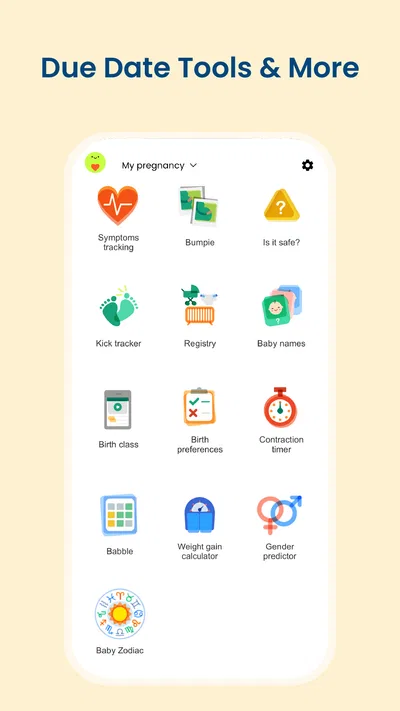
- Includes tools for monitoring baby kicks and contractions.
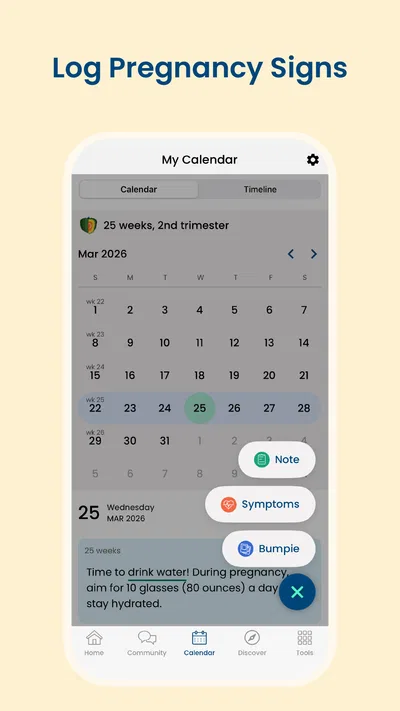
- Offers a convenient place to record pregnancy notes.
- Provides reminders for important pregnancy milestones.
- Can help users prepare questions for prenatal appointments.
Cons
- Some features may require a paid subscription.
- Personalized estimates are not a substitute for medical advice.
- Frequent reminders may feel overwhelming.
- Pregnancy tracking can involve sharing sensitive health information.
- Some content may not match every pregnancy or birth plan.
Best Parenting App 2026
Our verdict
Track baby’s development & growth week by week with BabyCenter’s pregnancy app!
Frequently Asked Questions
What can you track with Pregnancy App & Baby Tracker?
Pregnancy App & Baby Tracker is designed to help you follow key parts of pregnancy and prepare for your baby’s arrival. Depending on the features available in your version, you may be able to view pregnancy week and fetal-development information, record symptoms or appointments, monitor changes, and use tools such as a due-date calculator or kick counter. It is a personal tracking aid, not a substitute for medical care.
How does Pregnancy App & Baby Tracker calculate your due date and pregnancy week?
The app generally estimates your pregnancy timeline using information you enter, such as the first day of your last menstrual period or a due date provided by a healthcare professional. Its week-by-week content can make it easier to follow approximate milestones, but the estimate may differ from a date established by a clinician or ultrasound. Check your entries carefully and ask your healthcare provider which date to use.
Is Pregnancy App & Baby Tracker a replacement for advice from a doctor or midwife?
No. Pregnancy App & Baby Tracker can help organize information and offer general educational content, but it cannot diagnose a condition, assess your individual pregnancy, or provide emergency care. Pregnancy symptoms and recommended care vary from person to person. Contact your doctor or midwife about health concerns, and seek urgent medical help for severe or alarming symptoms rather than relying on an app or its tracking tools.
Does Pregnancy App & Baby Tracker collect personal or pregnancy-related information?
A pregnancy tracker may ask you to provide details such as dates, symptoms, or personal preferences so it can tailor its timeline and reminders. Before entering sensitive information, review the app’s current privacy policy and the data-safety disclosures on Google Play or the App Store. These explain what information may be collected, how it may be used or shared, and whether account, notification, or deletion options are available.
Is Pregnancy App & Baby Tracker free, and does it work on Android and iOS?
Availability, pricing, and included features can vary by country, device, and app version. Check the listing for Pregnancy App & Baby Tracker in your device’s official store to confirm whether it is available for Android or iOS, what operating-system version it requires, and whether it includes ads, subscriptions, or in-app purchases. Reviewing those details before downloading helps you know which features are accessible without extra payment.

Download Pregnancy App & Baby Tracker
Similar apps
View all 9.7
FamilyAlbum - Photo Sharing
Parenting
 9.2
Speech Blubs: Language Therapy
Parenting
 8.1
Findio: GPS phone tracker
Parenting
 8.6
AppClose: Co-Parent Essentials
Parenting


