
- Award score
- 4.7Rating
- 100,000,000+installs
- Free
App information
Screenshots







 Analysis byAppsAward
Our review of Walmart: Shopping & Savings
I judge a shopping app not only by how quickly it gets me to a product, but by whether I can use it comfortably when I’m tired, in a hurry, or shopping from somewhere unfamiliar. Walmart is a free shopping app from Walmart, and its broad mix of groceries and everyday merchandise makes it useful for more than one kind of errand. My overall impression is practical rather than flashy: it can reduce the work of planning a shop, but it still asks you to navigate a large retail catalog and make decisions about fulfilment and products.
Finding your way through a very large store
The main challenge with Walmart is also part of its appeal: there is a lot to shop for. Groceries, household supplies, and other everyday items sit within the same retail experience, so I can build a broad list without switching between separate specialist apps. The trade-off is that a large catalog can feel busy. If I know the item or brand I want, searching is a more direct starting point than browsing without a plan.
I find it helps to shop with a purpose. For a routine grocery order, I would begin with the staples I already know I need, then look for anything missing from the list. For an unfamiliar purchase, I would slow down and check the product details rather than treating the first result as an obvious match. Search and category browsing serve different needs: one is efficient when you have a specific target, while the other is better for exploring options.
Articles related to Walmart: Shopping & Savings
The app is rated for Everyone, and Walmart has an average rating of 4.7 from around 7.6 million ratings. Those figures suggest that a large number of people use and assess it, but they do not tell me whether its screens will suit a particular person’s reading or navigation needs. I would treat the rating as background, not as a substitute for trying the app with the phone settings and shopping routine I actually use.
One useful habit is to separate “must have” items from flexible choices before placing an order. That matters in a broad retailer where similar products may differ in size, brand, or type. I would check each item in the cart before checkout, especially when buying household basics in quantities I do not regularly purchase. This small pause can prevent a rushed tap from turning into the wrong version of a familiar product.
Readable choices matter more than a quick scroll
For anyone who finds dense screens tiring, I recommend keeping the task narrow: search for one item, review the result, and then add it before moving on. This is easier to follow than jumping between several categories and trying to remember which product was the right one. If a product name or image is ambiguous, opening its details is worth the extra step.
I also would not assume that a product image tells the whole story. Packaging can look similar across sizes or varieties, and an image may be less useful than the written description when comparing close alternatives. My practical approach is to use the image to recognize a product, then rely on the listing’s text to confirm the choice. That is particularly helpful for repeat purchases where a small difference can matter.
Walmart’s scale is a benefit when I need groceries and non-food essentials together, but it means the app is not as focused as a dedicated grocery tool. A specialist service may feel simpler if the only task is selecting fresh food. Walmart is more compelling when I want one shopping destination for a mixed list and am willing to spend a little attention checking the details.
Touch, pace, and sensory comfort
Shopping on a phone involves repeated taps, typing, scrolling, and reviewing choices. That can be tiring for someone with limited dexterity, hand pain, or difficulty maintaining a steady grip. I would reduce unnecessary movement by making a list first and using search for known items rather than browsing every aisle on screen. When possible, completing one category at a time also makes it easier to notice what is already in the cart.
I cannot judge a person’s motor or sensory experience from the app’s general reputation. Screen size, text settings, hand control, and tolerance for busy product pages all change what feels manageable. If scrolling is uncomfortable, a short, deliberate session is likely better than trying to do the entire shop in one long pass. If visual comparisons are difficult, checking written details and asking a trusted person to review the cart can be a sensible safeguard.
There is also a real attention cost to shopping among many alternatives. Promotions, similar listings, and broad selection can make a simple errand feel like a string of decisions. I find it useful to decide in advance which products I am willing to substitute and which ones need to be exact. That boundary keeps the shopping task from expanding into an open-ended search for the “best” option.
A concrete everyday example: if I am preparing for a busy week, I can use the app to collect pantry staples, cleaning supplies, and a few other household needs in one place. I would build the order while seated, check the sizes and product variants at a calm pace, and review the final cart before committing. That workflow is less stressful than trying to remember everything during a hurried in-store trip, though it still depends on carefully checking what I selected.
Using it around real-life constraints
The app’s central promise is convenience for groceries and essentials, but convenience depends on the situation. If I am at home with time to compare items, the broad selection can be useful. If I am on a weak connection, in a noisy place, or trying to shop while managing another task, I would keep the session short and avoid making delicate choices under pressure. A product decision that needs careful reading is better handled when I can focus.
For someone who cannot easily visit a store, online shopping can remove the need to walk through aisles and carry a full basket. It may also help a caregiver coordinate household needs from one device. But I would not assume that every order is equally suitable for every location or circumstance. Before relying on a particular shopping plan, I would check the options shown for the items and destination in the app and leave time to adjust if something does not fit.
Walmart has more than 100 million installs, and its current version is 26.40.1. It first appeared on May 6, 2011, and the app supports devices running OS version 9 or later. For a prospective user, the practical point is to check compatibility before planning a new routine around it. A large installed base does not guarantee that the latest experience will feel easy on every device, especially if an older phone is slow or difficult to operate.
Compared with a local store’s own app, Walmart can be appealing when I want a wide assortment rather than a narrow shop-specific catalog. Compared with a specialist grocery app, it may be less focused for a food-only run, but more convenient for combining groceries with everyday merchandise. I would choose based on the actual list: for a single specialty item, a focused retailer may make comparison easier; for a mixed household basket, Walmart’s breadth is the more useful advantage.
Where the experience can still create friction
The biggest limitation for me is not that the app lacks things to buy; it is that the amount of choice can make careful shopping take longer. A user who needs a highly predictable, low-distraction interface may prefer a smaller catalog or a familiar local option. Likewise, anyone who finds product comparison exhausting should avoid making a large order in one sitting without a prepared list.
There is also a difference between being able to place an order and feeling confident about it. A person with low vision, limited dexterity, or sensory sensitivity may need to test the interface directly and see whether their device’s own accessibility settings make it comfortable. I would not promise that the app accommodates every individual need. If essential controls or product details are hard to perceive or operate on your device, asking someone to help with the final review—or choosing a different shopping method—is reasonable.
Another point worth considering is how much you trust yourself to catch a wrong variant before checkout. When items look alike, a fast shopping session raises the chance of choosing the wrong size or type. I recommend reviewing the cart as a separate final task rather than assuming that every addition was correct. That habit is useful for everyone, and especially for shoppers who are interrupted or fatigued.
The app is free, which makes it easy to try without paying for access to the app itself. That does not mean every shopping decision is effortless or that the app is automatically the right fit. I would install it if I regularly buy a mixture of groceries and household essentials, then test a small, familiar list first. A low-stakes trial is a good way to see whether search, product details, and checkout fit your preferences before making it part of a more demanding routine.
A practical choice, with personal fit to consider
Walmart is a strong option for people who value a broad everyday assortment and want to organize several kinds of shopping in one place. I especially like the idea of using it for a planned household restock, where I can search for known staples and then check the details calmly. It is less suitable for someone who wants a very simple, tightly curated grocery experience or who cannot comfortably manage a crowded retail catalog on their phone.
Walmart is developed by Walmart and is available at no charge, with an Everyone age rating. I would describe it as useful rather than universally accessible: the shopping range can remove practical errands, but the size of the catalog and the need to inspect choices create work of their own. My best advice is to make a list, shop in short sections, verify look-alike products, and review the cart before placing an order. If those steps feel manageable on your device, Walmart: Shopping & Savings can be a convenient part of an ordinary routine.
For a reader deciding whether to try it, I would start with one familiar, modest shop and pay attention to the experience, not just the outcome. Notice whether the text is comfortable to read, whether you can operate the controls without strain, and whether the range of choices helps or distracts you. If it works well, the app can make mixed shopping more organized. If it adds stress or makes essential details hard to check, a focused alternative or a different way of shopping may be the kinder choice. Overall, Walmart: Shopping & Savings earns its place for convenience and breadth, with the honest caveat that a wide retail experience still asks the shopper to steer it carefully.
Pros
- In-store pickup can save time compared with shopping inside.
- A barcode scanner helps check product details while browsing.
- Digital receipts make past purchases easier to track.
- The app supports convenient pharmacy prescription management.
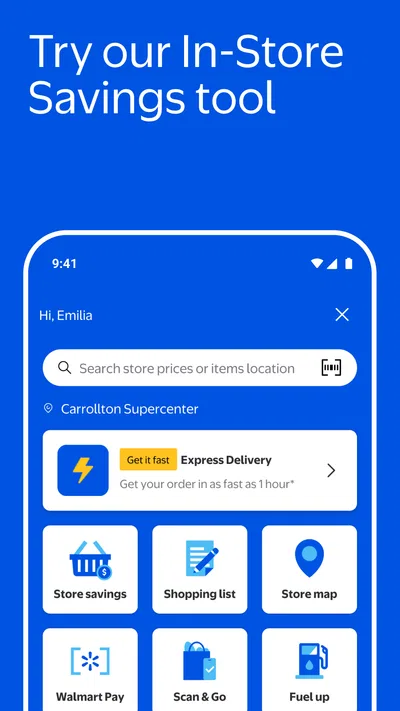
- Store maps can help locate products during a shopping trip.
Cons
- Some features may vary by store or location.
- Prices and product availability can change before checkout.
- The app requires an account for personalized shopping features.
- Location access may be needed for nearby store services.
- Checkout can be disrupted by slow loading or connectivity issues.
Best Shopping App 2026
Our verdict
Groceries, essentials & more, delivered fast.
Frequently Asked Questions
What can you do with the Walmart: Shopping & Savings app?
The Walmart app lets you browse products, compare prices, check availability at nearby stores, and shop for groceries and general merchandise. Depending on your location and the items you choose, you may be able to arrange pickup, delivery, or shipping. The app also provides features such as digital receipts, order tracking, and access to eligible savings offers, though availability can vary by store and region.
Can you use the Walmart app to order groceries for pickup or delivery?
Yes, the app supports grocery pickup and, in eligible areas, delivery. You can add items to your cart, choose an available time slot, and review any applicable fees or minimum order requirements before placing the order. Product availability, substitutions, delivery coverage, and time slots depend on your local store, so check the details shown in the app before checkout.
Does the Walmart app offer discounts, coupons, or other ways to save?
The app can help you find savings through displayed prices, eligible offers, and features such as Walmart Cash or digital promotions where available. Offers and reward eligibility may change, and some require activation or specific purchase conditions. Read each offer’s terms in the app and confirm that it applies to your location and order; not every product or shopper will qualify for every promotion.
Is the Walmart: Shopping & Savings app free to download and use?
The app is generally free to download, and browsing products or managing many orders does not require a paid app subscription. However, the cost of items, delivery or service fees, and any membership benefits are separate and depend on the order and location. Review the final checkout total carefully, since optional services, taxes, substitutions, and delivery choices can affect what you pay.
What information and permissions might the Walmart app use?
Like other shopping apps, Walmart may collect information related to your account, purchases, searches, and app usage. Location access can help show nearby stores, local inventory, and relevant pickup or delivery options, but you can usually manage location permission through your device settings. Check the app’s current privacy policy and permission prompts to understand how information is handled and choose settings that suit you.

Download Walmart: Shopping & Savings
Similar apps
View all 8.9
Temu: Shop Like a Billionaire
Shopping
 9.0
Vinted: Shop & sell pre-loved
Shopping
 9.5
Whatnot: Shop, Sell, Connect
Shopping
 9.2
Walgreens
Shopping
 9.6
DealSeek: Coupons & Discounts
Shopping